A page-by-page walkthrough of the whole plugin — every screenshot is from the live app. The player is free forever; the Pro features and preset packs are marked as we go.
Covers the current release. New in 1.25: the Amp Room (beta) with its amp and cab builders, REPORT A PROBLEM and a touch view for touchscreen PCs. New in 1.21: plugin slots for your own VST3/AU effects, SPEAKER DRIVE on the cab page, ten scenes, a second drive slot, the bass rig and a laptop view — and a six-chapter video tour if you would rather watch than read.
New:NAM 9000 for new users — one narrated 9-minute video, a chapter per topic, on the current version. The silent tour below is from an earlier version.
Video tour · six short chapters
Watch it work — five minutes, start to finish
Six captioned chapters recorded from the live app, each zooming in on the control being explained. They are silent by design, so they play anywhere — read along, or watch all six as one 5-minute cut. The written manual below goes deeper on every page they show.
1:101 · Getting started Options → audio settings, the three views, the page icons, INPUT / GATE / OUTPUT, the rig plate, the bottom bar and the gear.1:122 · Amps and cabs The library and its badges, loading a head, switching channels, the real GAIN knob, knob explainers and the cabinet page.0:503 · Pedals, EQ and effects Footswitches and drag-to-reorder, the GD-808, ADD PEDAL, both equalisers, the multiband, delay and reverb, the stereo rack.0:444 · Presets and scenes The preset chip and its menu, recents, the Presets tab, scenes in STAGE, and undo.0:395 · Auditions and unlocking Five-minute auditions, the key by email, UNLOCK… in the gear, paste and ACTIVATE, .nampack packs.0:346 · Capture your own amp The three capture steps, the 48 kHz rule, TEST and RECORD, training on your GPU, the plain .nam result.
1 · Getting started
Installed and playing in two minutes
One signed installer per platform — Windows (VST3 + AAX + Standalone) and macOS 11+ (AU + VST3 + AAX + Standalone, one universal build for Apple Silicon & Intel). No account, no activation — the player is free forever.
Run the installer and choose your formats. Both are digitally signed — Authenticode on Windows, notarized by Apple on macOS — so they install cleanly, no warnings to bypass.
On first launch it fills your library with factory content — the Brit 800 hero pack (our launch gift), its 18-capture GAIN sweep with a real working gain knob, the GD-808 Green Drive pedal, presets and a factory cabinet — so it makes real sound immediately, and it opens on a preset rather than on silence.
In a DAW, drop NAM 9000 on a guitar track — VST3, AU in Logic and GarageBand, or AAX in Pro Tools. Standalone? Pick your audio interface in Options and play.
Set Input so the meter sits healthy — or press AUTO under Output and play your loudest: it sets the output level for you, and the knob turns red if anything ever clips.
Pick a preset and go. New to amp sims? Hover any knob — a small card explains it in plain language (the ?-button in the bottom bar turns the explainers off).
The interface renders through the system webview — Microsoft Edge WebView2 on Windows (ships with Windows 11 and current Windows 10; the installer links the free download if it's ever missing) and WKWebView on macOS, which is built into the OS. Nothing extra to install on a Mac.
2 · The interface
One window, a row of pages
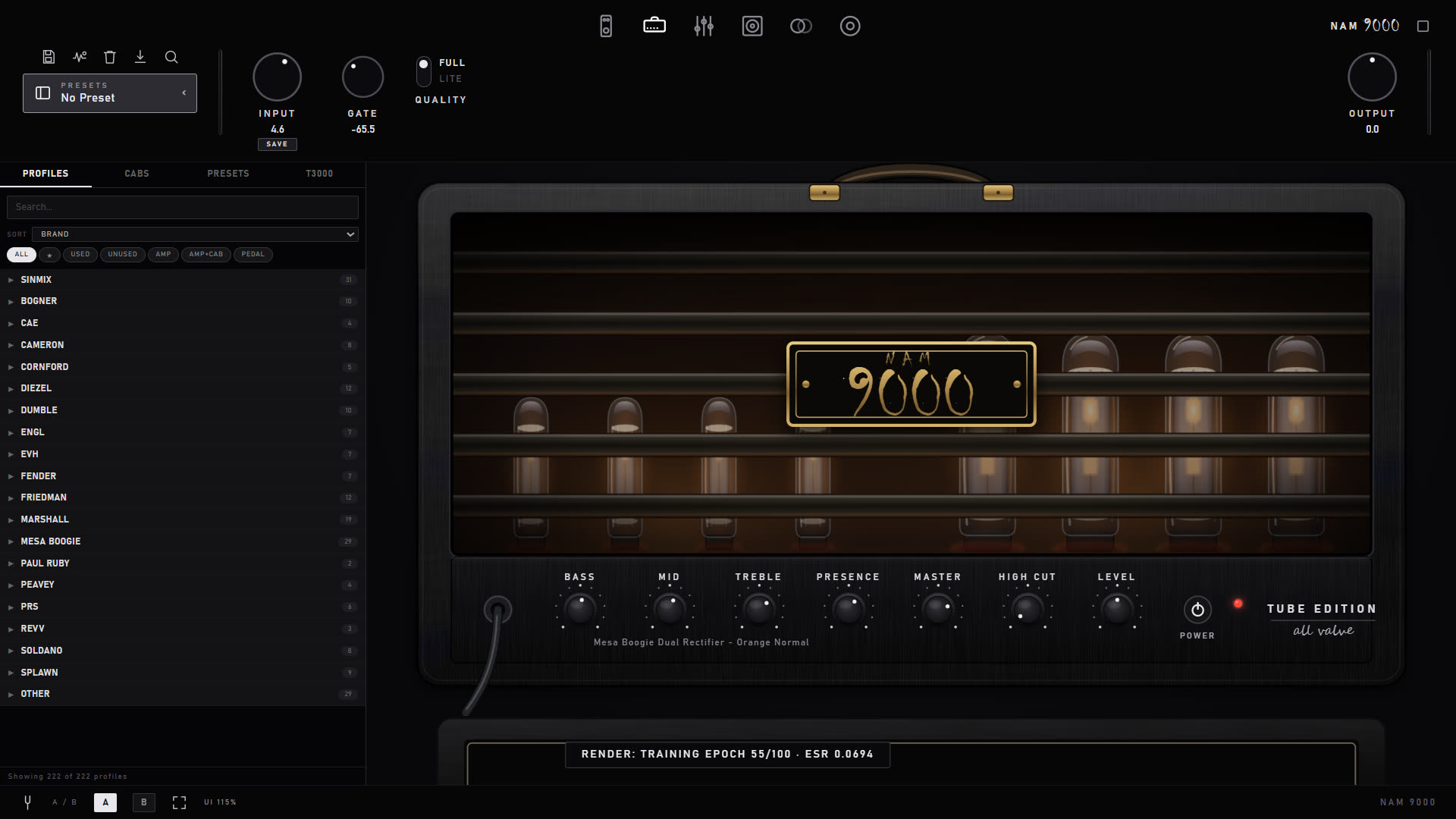
A top toolbar of global controls, a page for each part of the rig, and a bottom bar of utilities. The whole UI is vector art, so it stays razor-sharp at any size.
Always visible
Input / Gate / Output and a Full / Lite quality switch in the top toolbar. The gate learns your rig's noise floor (AUTO), and the 4CM button adds a second gate stage after the amp, keyed from your clean guitar — the 4-cable trick high-gain players use, without the cables. Output has its own AUTO: play your loudest and it sets the level, with a red clip warning on the knob if you ever go over
Page icons switch between Amp, Pedalboard, EQ, Multiband, Cabinet, Time FX and the Capture studio
The preset chip top-left always names the rig you're on, with a dot when you've changed something. Click it for a menu: UPDATE (save over it), REVERT TO SAVED, SAVE AS NEW…, and your recent presets. Loading a profile no longer wipes the name — the dot just tells you the rig has drifted from it
Bottom bar: browser toggle, tuner, A/B compare, an L/R balance meter with one-press MATCH, a knob-explainer toggle, and a UI-size control — Auto, or a continuous 60–200% slider so it fits any screen
Ctrl-Z / Cmd-Z undoes anything you just did — a knob sweep counts as one move, and it covers amp, cab and preset loads too
A gold UPDATE badge appears in the toolbar when a new version ships (one anonymous check a day, switchable off) and opens the release notes right in the app
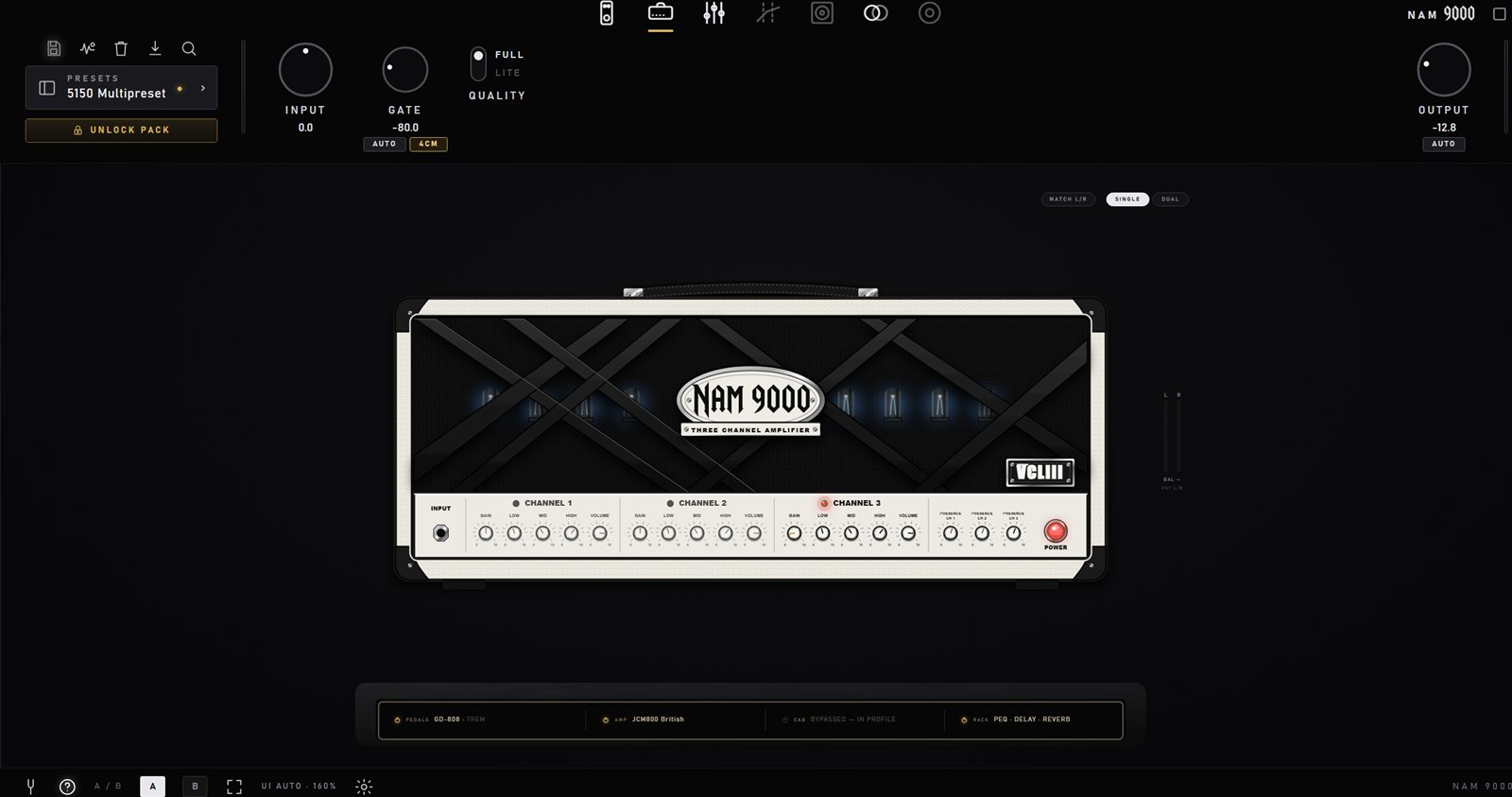
The preset chip and its menu — the dot means the rig has drifted from the saved version. The rig plate sits under the amp.
The rig plate — the whole signal chain at a glance
Under the amp sits a brass plate listing what is actually in your chain right now: PEDALS, AMP, CAB and RACK, each naming what is loaded and engaged. It is not decoration — every cell is live:
Each section has a ⏻ switch. PEDALS and RACK are masters: switch them off and every engaged unit goes with them, switch back on and the exact same set returns — the fastest way to hear your rig with and without the extras
The AMP cell's switch is the same power switch as the one on the head, so the two can never disagree
Load anything and the matching cell pulses gold, so you always see where a click landed
Input calibration — optional, for profiles that carry a reference
Some captures record the analog level they were made at. If yours do, and you want them driven exactly as hot as the capture rig was, open the UI-size popover and tick Calibrate to under INPUT CAL, then enter what your interface clips at in dBu (0 dBFS = that level — most Hi-Z guitar inputs are +12 to +13, and 12.2 is the common convention other loaders use). Profiles without that metadata are left completely alone, and with the box unticked levels pass through as-is — so this is a nicety for matching reference-carrying profiles, never something you must set up before playing.
Lite graphics — for older machines
The interface's moving glow, tube flicker and worn-metal textures cost GPU/CPU that an older laptop may want back. Click the UI-size label in the bottom bar and enable Lite graphics (static) under GRAPHICS: those elements become static, the meters stop animating, and the interface CPU roughly halves — the amp page benefits most. The audio path is untouched — it is purely paint work — and the setting is remembered per machine.
Laptop view — for small screens
On a laptop screen the full layout gets cramped. Open the settings popover and pick VIEW › Laptop: the controls stay full size, the effects rail runs the full height of the window, and the EQ and MB COMP get a wide layout. Switch back to the regular view the same way.
Touch view — for touchscreen PCs (Windows)
Settings popover › VIEW › Touch turns NAM 9000 into a light, big-knob screen for touchscreen mini PCs: a header with the tuner, the preset with ‹ ›, SAVE, the DSP load and a gear (view, input / output, quality, MIDI, full screen), and five pages — PEDALS, AMP (in the amp's own colours and badge, with its channels), CAB, EFFECTS and SCENES. The normal console sleeps while it is open, so it costs very little CPU. Hold a knob or a switch to MIDI-learn it. Leave it from the gear › VIEW › Standard. Windows only.
3 · Three views
Console, stage, studio — one rig, three ways to stand in front of it
The tabs top-centre switch how the same rig is shown. Nothing loads or changes when you switch — the two extra views are built when you enter them and torn down when you leave, so they cost nothing while closed. Esc always brings you back to CONSOLE.
CONSOLE
The page-per-block view everything below describes: stomps, amp, EQ, multiband, cab, time FX and the capture studio, with the rig plate under the amp. This is where you build a tone.
STAGE — the live view, at standing distance
STAGE — a four-channel head with its channel buttons, the board either side, three scenes and SCENE VOLUME in the strip below.
Fullscreen, big, built from your actual gear: the pedals on your board on the left, the amp (or both amps in a dual rig) in the middle with a gold card naming AMP / CHANNEL / CAB, the rack effects as three-knob pedal faces on the right, and two rails — IN with the gate and its AUTO, OUT with the level, a stereo meter and a huge tuner and tap-tempo readout. Everything is live: knobs turn, footswitches click, channel buttons switch the head.
Scenes — snapshots of the whole rig in the strip along the bottom: every knob and switch plus the channel of each amp; switching is one seamless move, no loading. Click + ADD SCENE, or press 1–9, 0 for the tenth, and the arrow keys. The free app holds two scenes per preset, both MIDI-learnable like any control; Pro holds ten, in two rows of five. A scene keeps whatever you last heard of it, so you never have to remember to save — right-click a scene cell to RENAME, UPDATE, DELETE or put it on a footswitch with MIDI LEARN
Single or dual per scene — in a dual rig, right-click amp B → DISABLE IN THIS SCENE — PLAY SINGLE, and that scene plays amp A alone exactly as single mode would while the next scene brings B back, both heads resident the whole time. The scene volume trim is what keeps the two at the same loudness
SCENE VOLUMEPRO — the button in the TAP cell opens big L/R output meters with peak-hold and a gold slider on a per-scene level trim (±18 dB). Switch scenes, watch where each peaks, trim them to match — then OUTPUT stays the one global master. It is a real parameter, saved in the preset
Zoom into any unit — hover a pedal, amp or rack unit, click the ⤢ pill (or press Z) and its full editor opens as a live overlay: the EQ and the multiband comp bring their whole pages in, everything else its faceplate. Z or Esc closes it
Right-click is the menu — pedals: MIDI LEARN / REPLACE WITH… / REMOVE; the gold wire: ADD PEDAL (in front of the amp) or ADD EFFECT (after it), captured drives included; the amp: BROWSE AMP MODELS (your library grouped like the browser, favourites and recents first), LOAD / REPLACE AMP B, CLEAR AMP B; any unit: HIDE FROM STAGE VIEW, which is visual only — it keeps processing and comes back from a pill at the bottom-left
Keys — 1–9 and 0 scenes, ←/→ previous/next scene, T tap tempo, M tuner, Z zoom, Esc back
The two OLED screens on the EQ and MB COMP faces show the live spectrum and the four gain-reduction bars; both park when their unit is bypassed. Scenes travel inside the preset file, so a preset without scenes is byte-identical to before.
STUDIO — the mixing engineer's view
STUDIO — the chain as a grid, the selected amp's editor below it with CHANNEL SELECT and live values, meters right, routing and analyzer along the bottom.
The whole chain as a grid of blocks in true processing order — IN → pedals → GATE → AMP → CAB → EQ → MB COMP → rack → DELAY → REVERB → OUT, with a dual rig split into A ⫽ B lanes that merge at a MIXER block — and the selected block's full editor in the window below. Frames around it carry what an engineer glances at: a left rail with scene chips, rig summary, DSP load and edition; a right rail with IN / OUT-L/R / GR meters and the output knob; a bottom strip with the routing map of the real rig (dual amps, dual cabs, the 4CM post-gate), tempo and TAP, the last MIDI CC seen, and the tuner.
Click a block, edit it — real editors, not summaries: knob panes with printed live values for the amp (tone stack included, in faceplate order), gate, mixer and I/O; the app's own CAB, EQ and MB COMP pages move in and back out; pedal and rack faces as live clones. The amp pane also draws the sweep strip: every measured capture point of a gain sweep as a dot, with a gold marker riding the GAIN knob
The chain is the preset's — drag pedals to reorder, right-click a block → REMOVE FROM CHAIN, and the + after the amp offers EQ, CABINET and the rack effects back (the + in front of the amp is the pedalboard's). The grid, the stage board and the console pages all read the same list, so they can never disagree
EFFECTS RACK — click the MOD / DELAY / REVERB window and four 19" units unfold, one per rack plate, with real hardware knobs on the real parameters. MB COMP gets a one-band-at-a-time editor with six big knobs and the four GR meters, plus presets
Dual cab pane — two cabs side by side with their own ‹ › steppers; the IR list marks both loaded cabs, gold for A and blue for B, and the arrow keys cycle the selected one
Make it yours — every frame hides (✕) and comes back from the ⚙ VIEW popover, which also has RESET TO DEFAULT; the grid/detail splitter and rail widths drag. The library browser docks as a column. The layout is remembered per machine and never stored in a preset
MIDI here too — right-click any effect or section for MIDI LEARN, including one switch for the whole pedalboard or the whole rack (they remember which units were on and bring back exactly that set)
Settings and maximize are the same two icons top-right in all three views. On a 4:3 or small screen STUDIO stacks its frames; the console pages are unaffected by anything you do in the other two views.
4 · The amp
Any neural capture, fully gain-staged
The heart of the rig. Load any standard .nam profile — from the built-in library, TONE3000, a preset pack, or your own captures — and dial it in on a real amp panel.
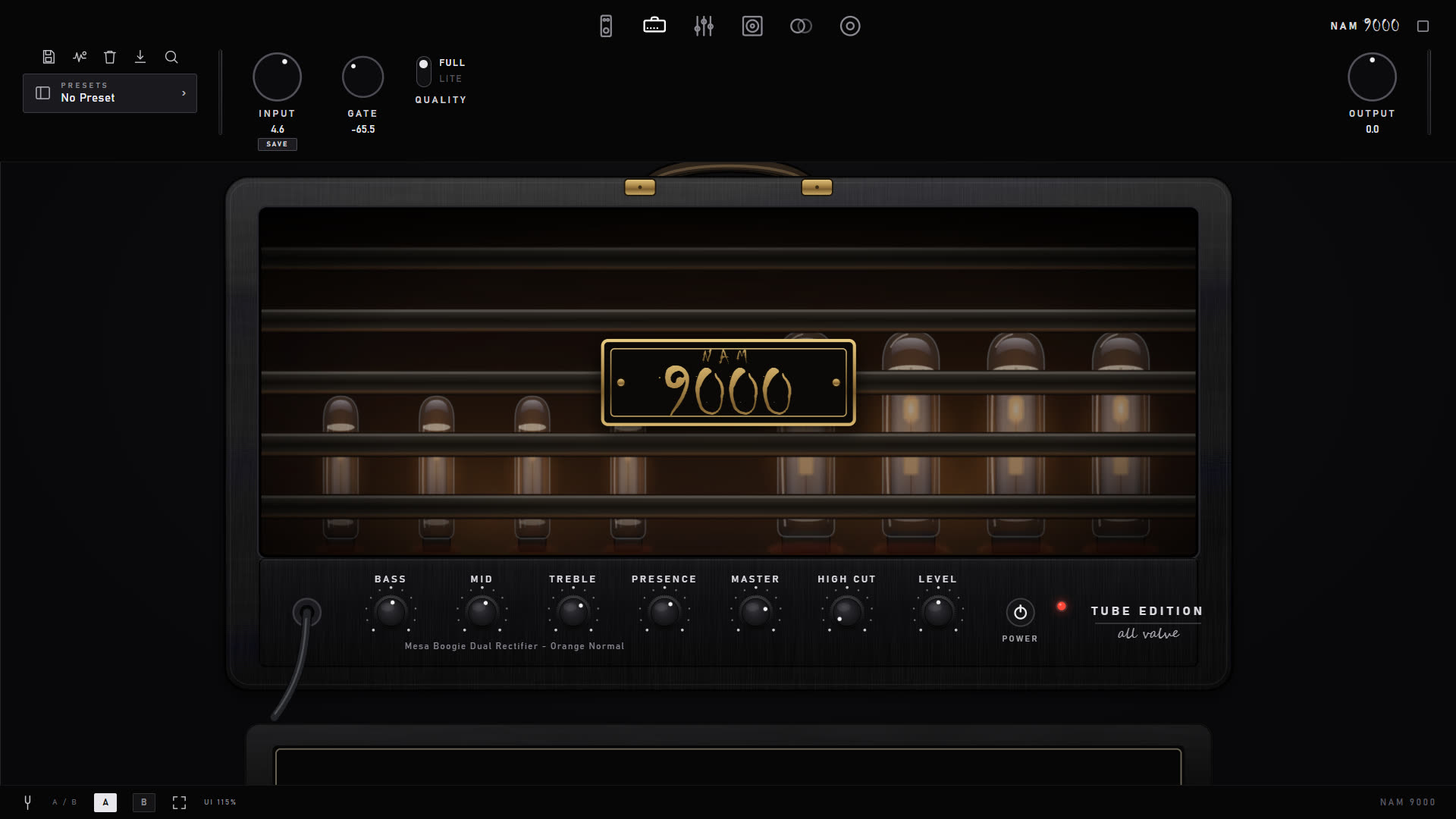
The amp page — profile name under the tone stack, rig plate below.
Gain, Bass, Mid, Treble, Presence, Master, High Cut and Level — a familiar amp face, not a list of sliders
The GAIN knob is real on any gain-swept profile: instead of filtering one capture, it crossfades between a dozen or more separate captures of the amp taken across its actual gain range, so turning it up changes how the amp breaks up, not just how loud it is. Every hero pack ships one
Full / Lite quality: full fidelity for mixing, a lighter model for stacking many instances live — switched without reloading
Full-rig captures (amp + cab baked in) automatically bypass the cabinet section; amp-only captures keep it active
5 · Multichannel amps
The whole head, channel switch and all
A normal capture freezes an amp at one setting. A multichannel amp is the entire amplifier: every channel captured as its own gain sweep, presented as the real head with its own faceplate and switches.
A three-channel head — click a channel to switch; each keeps its own settings.
Click a channel and the amp switches, exactly like reaching for the front panel. Clean, Crunch and Lead each remember their own gain and their own tone stack, so going back to a channel gives you the sound you left there
Amps with a voicing switch per channel (vintage/modern) get those too — the switch belongs to the channel, so flipping it never disturbs the other side
Amps that really have one shared knob row behave that way: switching inputs leaves every knob exactly where you set it, because that is what the hardware does
The right head appears by itself when you load any of its channels — including from a preset, which stores the head it was built on
Look for the steel 3 CH / 2 CH badge in the browser, and the MULTI-CH filter pill to see only these amps. Presets built on one carry the badge too
Free to try in the free app: every multichannel amp auditions free — all channels, no account — then your own amp returns. 2½ minutes at a time, 5 minutes with Pro, and you can start another whenever you like. The head downloads itself once, in one go, the first time you play it
The free app also ships factory presets built on these amps, so you can hear one in a finished, mixed rig rather than judging it from a bare head
Multichannel amps are optional add-ons (one is included with NAM 9000 Pro). Unlocking is one step — paste the key, see Unlocking what you bought. See the packs page.
6 · The pedalboard
A reorderable stomp chain — with captured drives
Drag pedals into the order you want: a compressor, the GD-808 Green Drive, a slot for any captured pedal, plus boost, wah, pitch, phaser, flanger, tremolo and chorus.
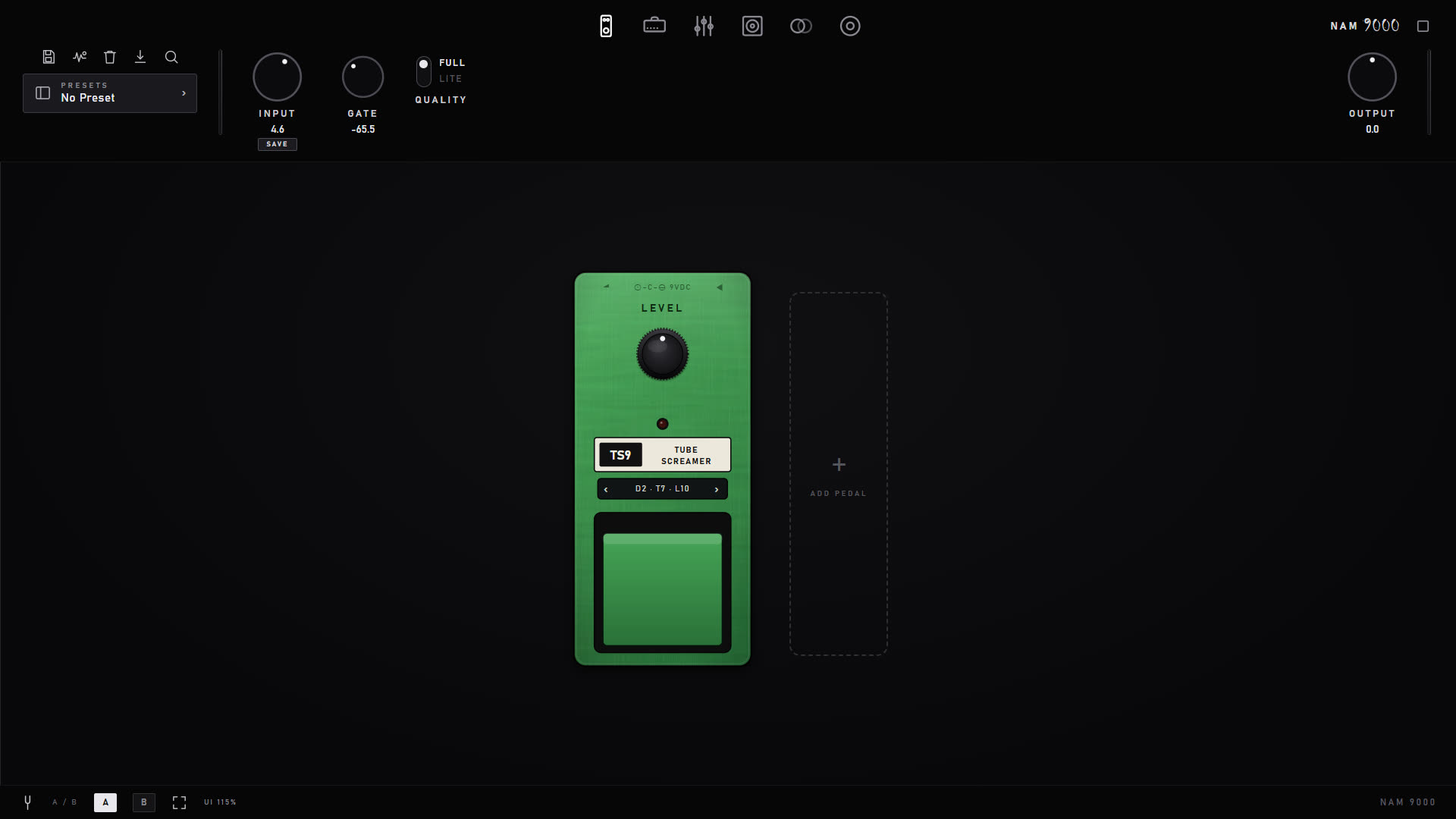
The pedalboard — drag to reorder; each pedal engages and bypasses with a click.
GD-808 Green Drive — the screamer, captured nine times
The built-in overdrive is not a filter pretending to be a pedal. Its DRIVE knob rides nine real captures of the pedal taken across its drive range, so every position is the actual circuit clipping the way it really does at that setting. TONE and LEVEL work as they do on the hardware (TONE at noon is the capture untouched). It ships with the free app — turn the knob and you can hear exactly what a multi-captured pedal buys you before paying for one.
Fifteen more drives, free to audition
The ADD PEDAL menu lists fifteen more drives, grouped the way players think — Screamer, Modern boost, Transparent, Tube, Distortion, Fuzz and Bass. Every one is a multi-point capture with the same working DRIVE knob. Three of them are our own circuits rather than captures of famous boxes: NAM BOOST, NAM LEAD and CIRCUIT SLAMMER. You can play any of them for 30 seconds at a time before you buy, marked PREVIEW, so you hear it in your own mix first; buying just stops the clock.
The NAM CAPTURE slot
Loads any captured drive or fuzz — yours or ours — in front of the amp capture: two neural engines in series
Load a gain-swept pedal into it and a gold DRIVE knob arms, sweeping that pedal continuously just like the GD-808
Clicking a pedal capture in the browser routes it here automatically — you don't have to pick the slot
Two drives in one chain
The board holds a second drive slot, so you can stack two drives — the GD-808 into another drive, say — and order them like any other pedal. When a preset asks for a drive you don't own, the GD-808 takes its place.
Your own plugins as pedals PRO
With Pro, Pro Bass or Premium, ADD PEDAL › PLUGIN puts one of your own VST3 effects (AU on Mac) on the board, or between the effects after the amp — up to four at a time, saved with your presets. The full guide: Plugin slots.
The bass rig
The BASS filter in the browser shows the bass heads, cabs and pedals. SPLIT DRIVE is a three-band bass drive: the lows stay clean with their own compressor while the mids and highs are driven, with a live band display you drag the crossovers on, per-band compression and level, BLEND and 13 presets. It comes with NAM 9000 Pro Bass and the Bass Pack, together with the Nampeg TVS and Bogie 400 heads and the Bass Cabs; everyone can audition the heads and cabs, and try SPLIT DRIVE for three minutes per session.
All the non-captured effects are in-house DSP, and engage/bypass is crossfaded rather than switched, so you can build tones while you play. The rig plate's PEDALS ⏻ master drops the whole board and brings back the same set.
7 · Studio EQ
A graphic and a parametric — at the same time
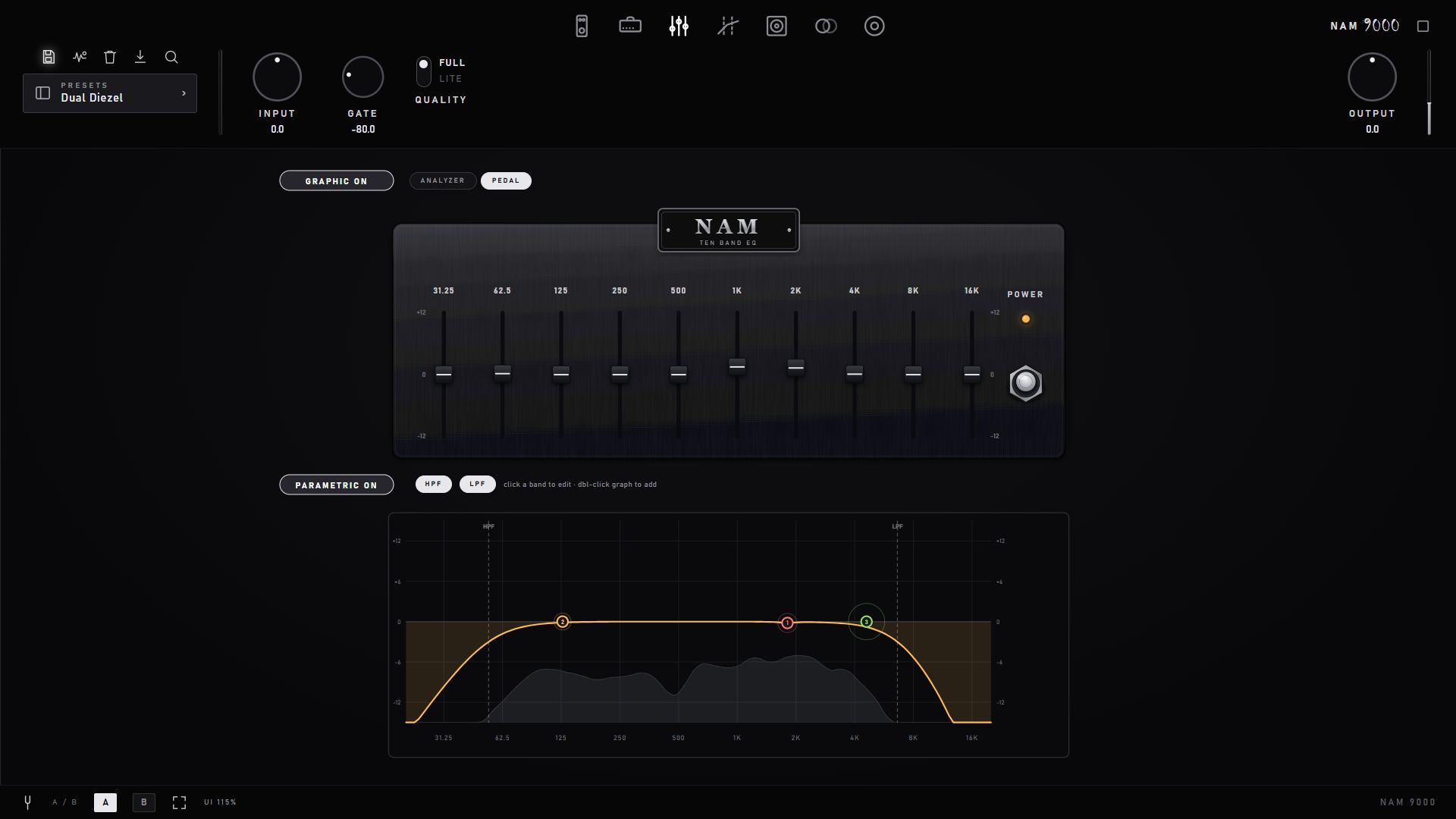
Two independent EQ panels with live analyzers: a 10-band graphic rack unit and an 8-band parametric, both usable at once for surgical and broad shaping.
The parametric EQ on its live analyzer.
Parametric: draggable bands over a real-time spectrum, with Nyquist-safe filters at any session rate
Graphic: fixed-band rack unit for fast, familiar moves
8 · Multiband compressor PRO
The metal-mixing weapon
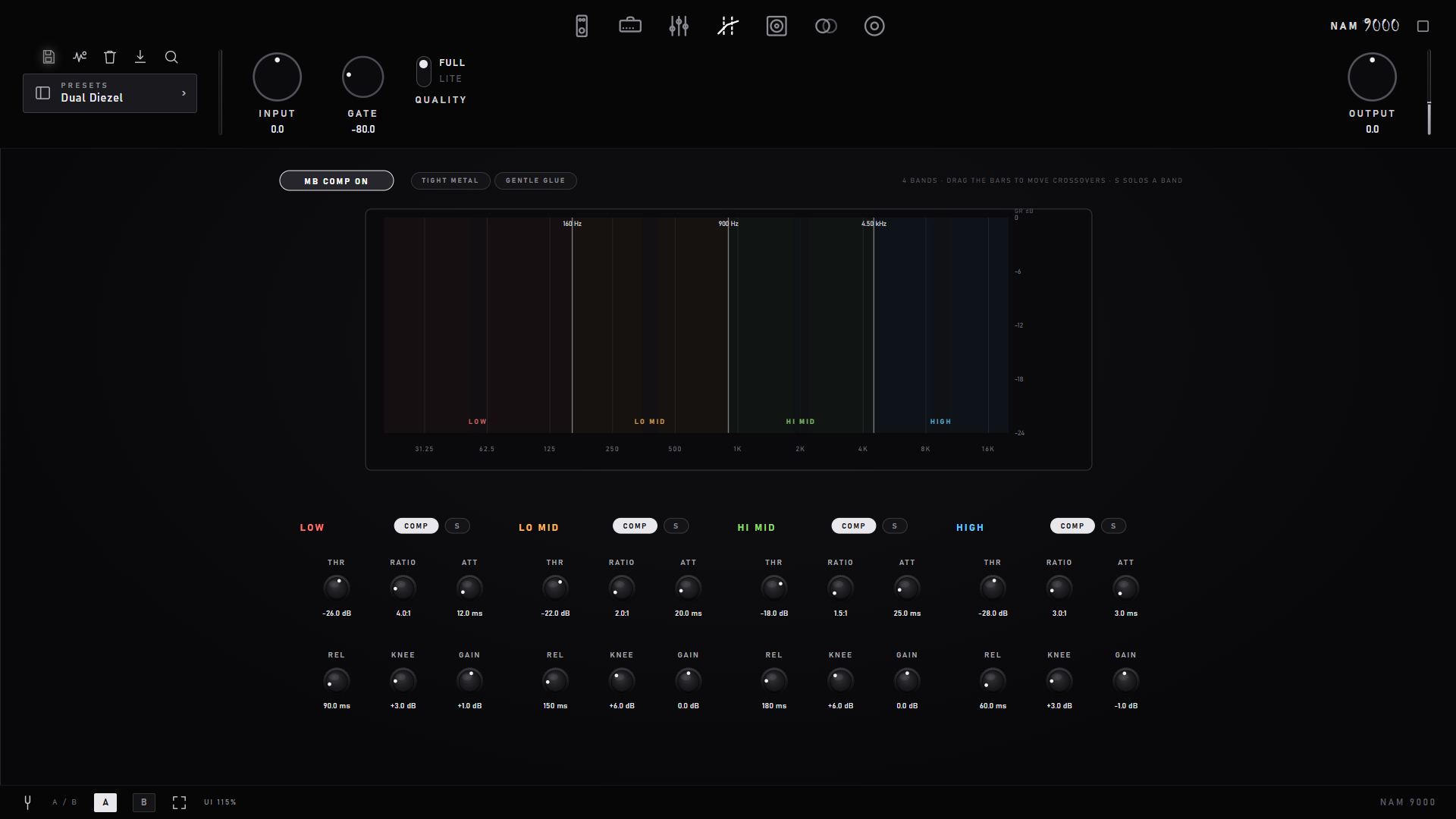
Four crossover bands, each with its own compressor and gain-reduction meter — tighten low-end chug without dulling the top, all inside the plugin.
Four-band multiband compressor with per-band GR metering.
Linkwitz-Riley crossovers, per-band threshold / ratio / attack / release
Starter presets — TIGHT METAL and GENTLE GLUE — get a tight modern tone in seconds, and they work in the free edition too
The free edition can apply the starters and switch it on/off; per-band editing is a Pro feature
9 · Cabinet
Real impulse-response convolution
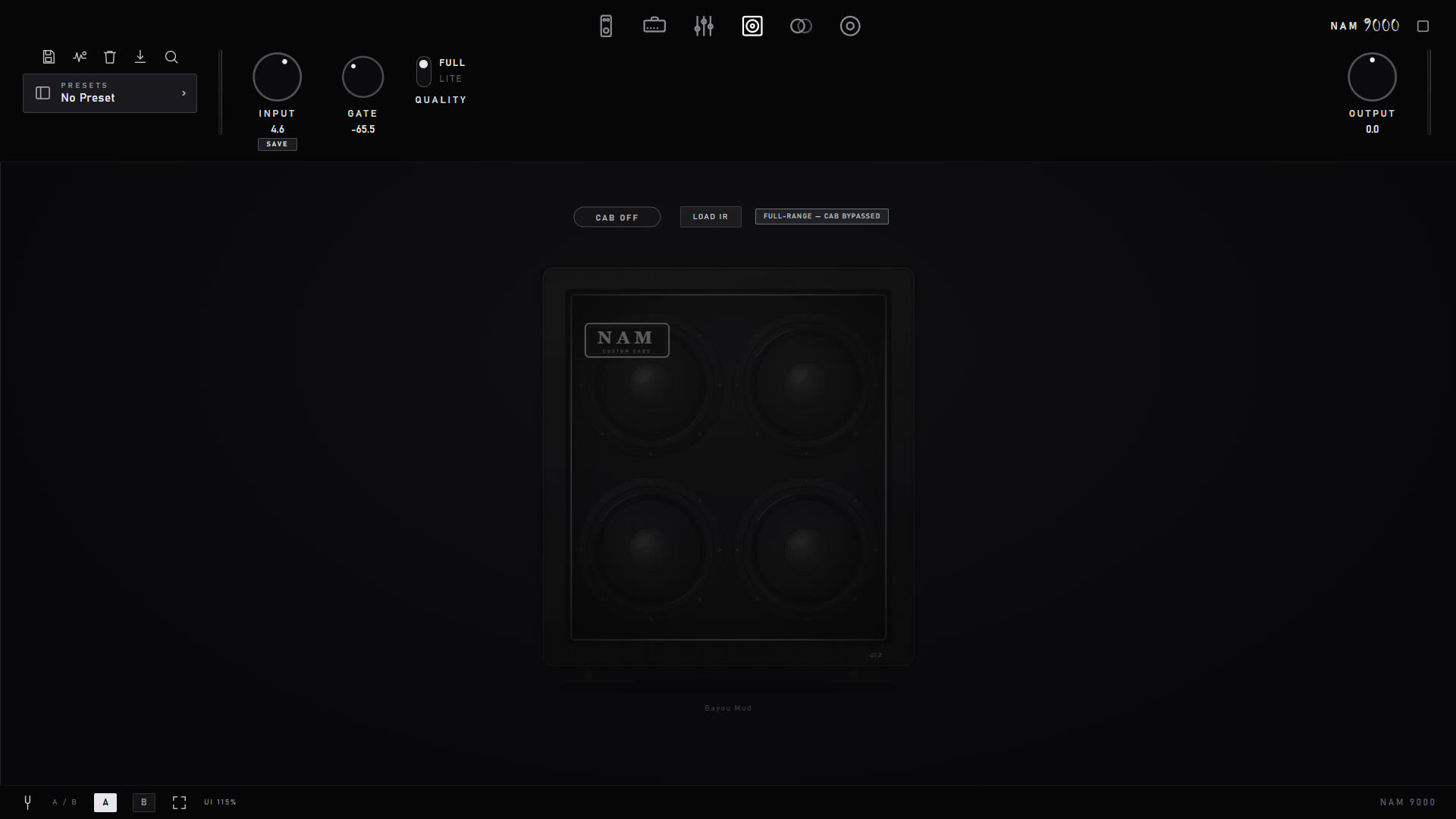
Load any .wav IR, or the factory blended-speaker cabinet. IRs are loudness-normalized on the guitar band so swapping a cab changes tone, not level.
The cabinet page — single IR, or the Pro dual-mic blend.
Per-rate IR masters (44.1 / 48 / 96 kHz) picked automatically to match the engine
Phase invert, high/low cut, and a Full-Range / Cab-Bypassed toggle for baked-in-cab captures
Twelve free factory cabs, among them the Brit Family 4x12, the House Cab and the Brutal 4x12 that the house heads and DI profiles are voiced on
SPEAKER DRIVE PRO
An IR is a photograph of a speaker; a real speaker moves. SPEAKER DRIVE sits between the amp and the IR and puts that movement back: hit it hard and the low end compresses and breaks up the way a pushed speaker does, while quiet playing passes through unchanged. Pick a 25 W, 60 W or 100 W speaker, then set DRIVE and SAG (the voice coil heating up on held chords). It works on any DI profile with any cab, and the free version shows it locked.
Cycling cabs — the fastest way to find the one
Comparing IRs by name is hopeless; comparing them by ear takes seconds. The ‹ › arrows beside the cab step through your whole IR library one at a time, and the left/right arrow keys do the same while the cab page is open — so you can keep both hands off the mouse, play a riff, and step until it sits. Each step names the IR and its position ("IR 14/57") in a toast.
The browser follows along and colour-codes what is loaded: a gold bar and gold name marks the IR in slot A, and a blue bar and blue name marks the one in slot B when you're running the dual-mic blend — so a long list always shows you where you are, and which of the two mics you're about to replace. (Amp rows use the same gold marker for the profile that's playing.)
In dual-cab mode the arrows step whichever cab you last touched, and clicking a cab's arrows also selects it — so the keyboard always follows the mic you're working on.
10 · Time FX
Delay and reverb to finish the chain
Post-cab time effects on one dual pedal: a multi-mode delay with tempo sync, and a four-engine reverb — the last stage before your rig is a mix-ready channel.
One dual pedal: delay on the left, four-engine reverb on the right.
Delay: digital, analog, tape and ping-pong modes, host-tempo synced
OFFSET spreads the repeats in stereo without ping-pong: the right side lags the left by up to 25 ms, so the echoes sit wide around your dry tone instead of bouncing side to side. At zero the delay is mono, exactly as before
Reverb with four engines — room, hall, spring and plate — true stereo tails, pre-delay and lo cut on the tail, one TONE knob from warm to airy
Trails: switch either off and the tail rings out naturally
Both ON switches glow with what you're actually hearing — the delay's ring follows its repeats, the reverb's follows its tail — so you can see the effect breathing even when it sits low in the mix
11 · Capture & training studio
Clone your own gear
Built-in profiler: play a test signal through your amp, pedal or whole rig and train a neural model of it — on your own NVIDIA GPU on Windows, or free in the cloud on Mac (and on any machine without an NVIDIA card). No separate software. This chapter walks through a whole capture, then Render Rig, which clones a rig you built inside NAM 9000.
What you need
The gear you want to clone — an amp head, a combo, a preamp, a drive pedal, or a whole rig of pedals into an amp into a cab.
An audio interface with a spare output. NAM 9000 sends the capture signal out of one output and records what comes back on one input. Capture in the standalone app: there the capture page picks its own output and input, separate from the ones you play through.
A reamp box for amps and pedals. An interface output is line level; a reamp box turns it into a guitar-level, guitar-impedance signal, so the amp reacts the way it does to your guitar.
For an amp: a load — a load box with a line out, or a speaker cab with a mic in front of it.
To train: on Windows with an NVIDIA GPU, NAM 9000 trains on your own machine (re-run the installer → Custom → Local GPU training). On a Mac, or a PC without an NVIDIA card, you capture exactly the same way and train free on TONE3000 (below).
A tube amp must always see a load. Never switch one on with nothing connected to its speaker output — use a load box or a speaker cab, at the impedance the amp is set to.
Hook it up
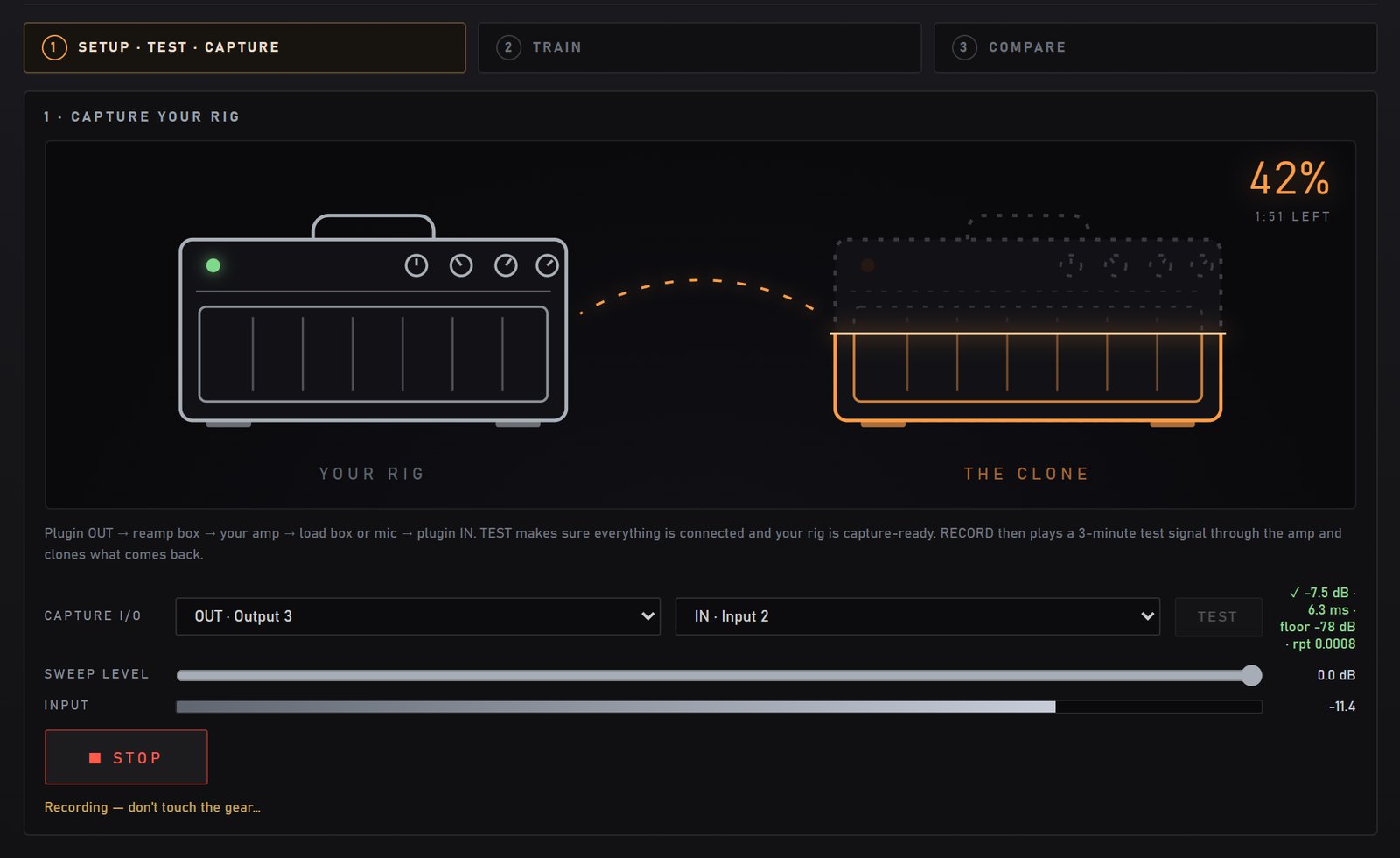
The signal makes one loop: out of the interface, through your gear, back into the interface. The gold line is what NAM 9000 sends; the light line is what it records. The output and input names are examples — use whichever your interface has free.
An amp head through a load box. GEAR: AMP (no cab) from a plain line out, or AMP + CAB if the load box puts a cab IR on its output.An amp and its cab with a mic. GEAR: AMP + CAB. A dynamic mic close on the cone is the classic start; phantom power only for a condenser.A drive pedal. GEAR: PEDAL. Return it into an instrument (Hi-Z) input. Leave the pedal's own noise gate or boost switch where you'll use it.Render RigPRO clones a rig you built in NAM 9000 — below.
1Set up and TEST
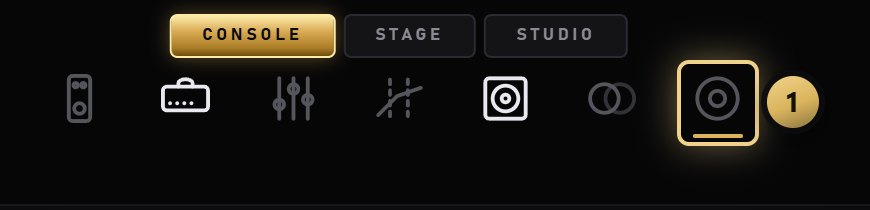
Open the capture page with the last of the page icons in the top bar.
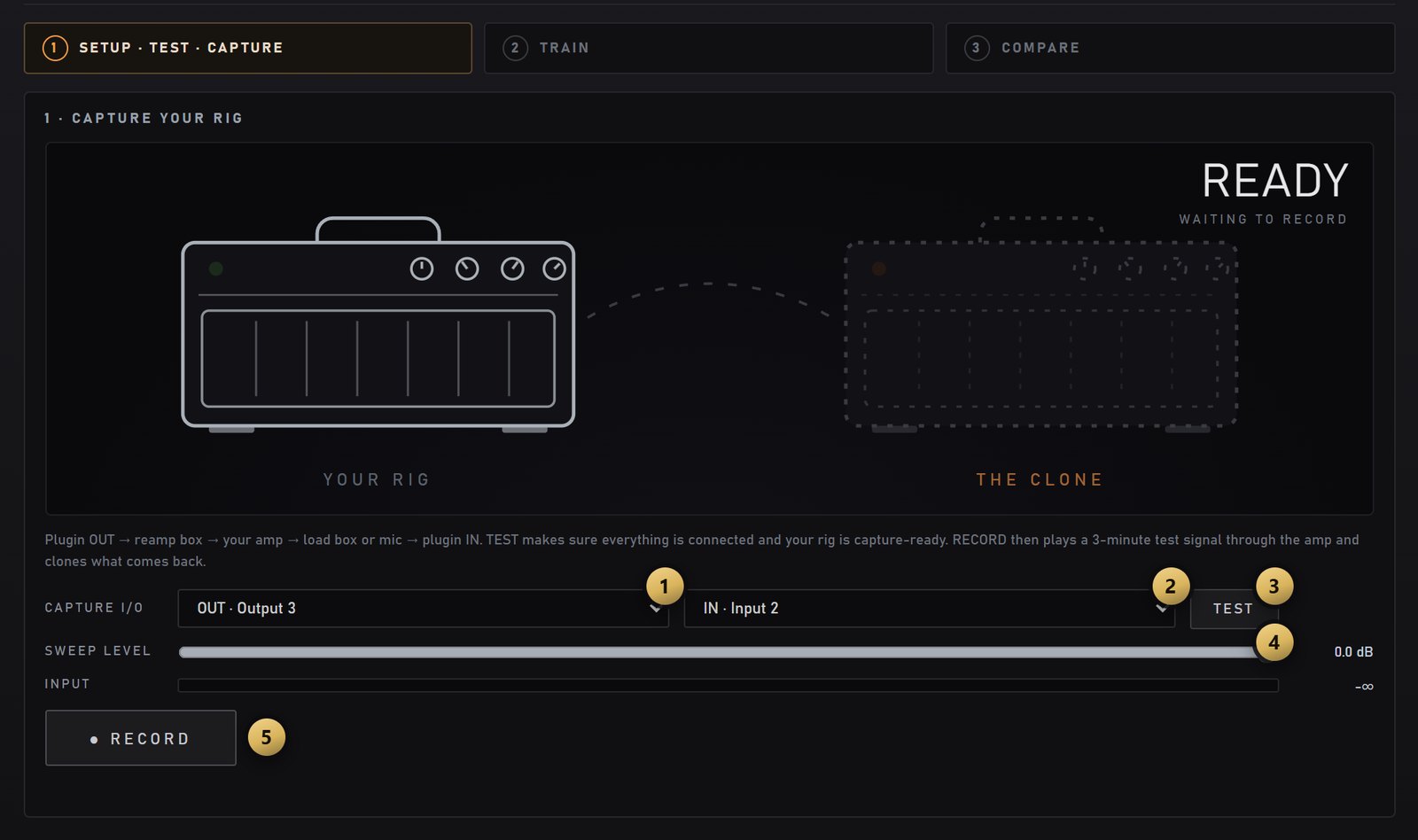
OUT — the interface output that feeds your gear (the reamp box). Pick a free output; OUT · MAIN would send the capture signal to the outputs you normally listen on.
IN — the input your gear comes back on: the load box's line out, the mic input or the pedal's output. IN · MAIN records the app's normal input, the one ticked under Options → Audio/MIDI Settings → Active input channels. On many 2-input interfaces the guitar jack is input 2.
TEST — plays two short bursts through your rig and checks the round trip: the level that comes back, the interface latency, the noise floor, and whether your rig answers the same way twice. Run it every time: it is also how NAM 9000 lines the recording up to the sample before training.
SWEEP LEVEL — how hard the capture signal hits your gear. Leave it at 0 dB unless TEST reports clipping, and set how hard the amp is driven with the reamp box, as you would for your guitar. Then set the interface's input gain so the INPUT meter peaks around −12 dBFS.
A good TEST: the level that came back (−7.5 dB), the round trip (6.3 ms), the noise floor (−78 dB) and the repeatability (rpt — lower is better).
✗ NO SIGNAL — nothing came back on the input you picked. Fix this before you record: troubleshooting.
To write the capture's input level into the file for NAM hardware players: open Settings (the cog, top right), and under INPUT CAL tick Calibrate to and enter the dBu that equals 0 dBFS at your interface's input. Leave it off if you haven't measured it — a guessed figure is worse than none.
2Record
RECORD plays the standard NAM capture signal — about three minutes of sweeps, noise and silence — through your rig and records what comes back. The percentage and the time left run in the corner; STOP cancels. Keep everything still while it runs: no knobs, switches or cables, and a quiet room if you use a mic.
When it finishes, the page moves on to TRAIN by itself. If the take clipped or came back nearly silent, the line under RECORD says so — ⚠ RECORDING CLIPPED or ⚠ Recorded peak only … dB — check the routing. Go back to step 1 rather than training a take like that.
3Train
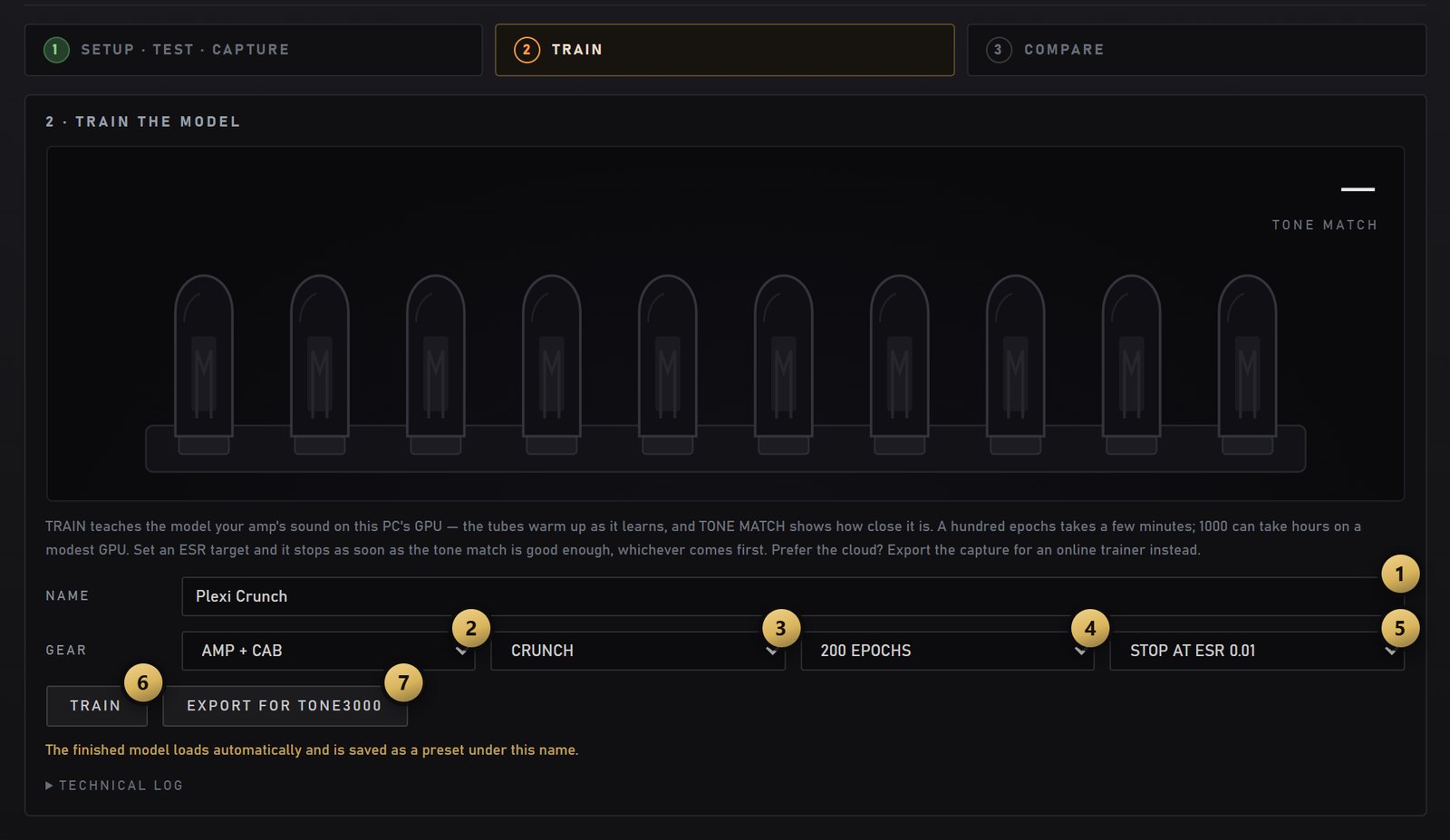
NAME — what the capture is called in your library, and the name of the preset saved with it.
GEAR — what you captured: AMP (no cab), AMP + CAB (with a mic, or a load box that adds a cab IR), PEDAL, PREAMP, or FULL RIG (pedals, amp and cab in one). A capture that already contains a cab plays with NAM 9000's own cab switched off.
TONE — a tag for the browser: clean, overdrive, crunch, hi gain or fuzz.
EPOCHS — the most it may train. 100 takes a few minutes on a modern NVIDIA GPU; 1000 can take hours.
STOP AT ESR — stop as soon as the clone is this close. ESR is the error left between the clone and your recording; lower is better. With a target set, the epoch count is only a ceiling, so an easy amp finishes early.
TRAIN — trains on your GPU. The very first run also compiles the GPU code, so it takes a minute longer to get going.
EXPORT FOR TONE3000 — saves the recording for free cloud training instead (below).
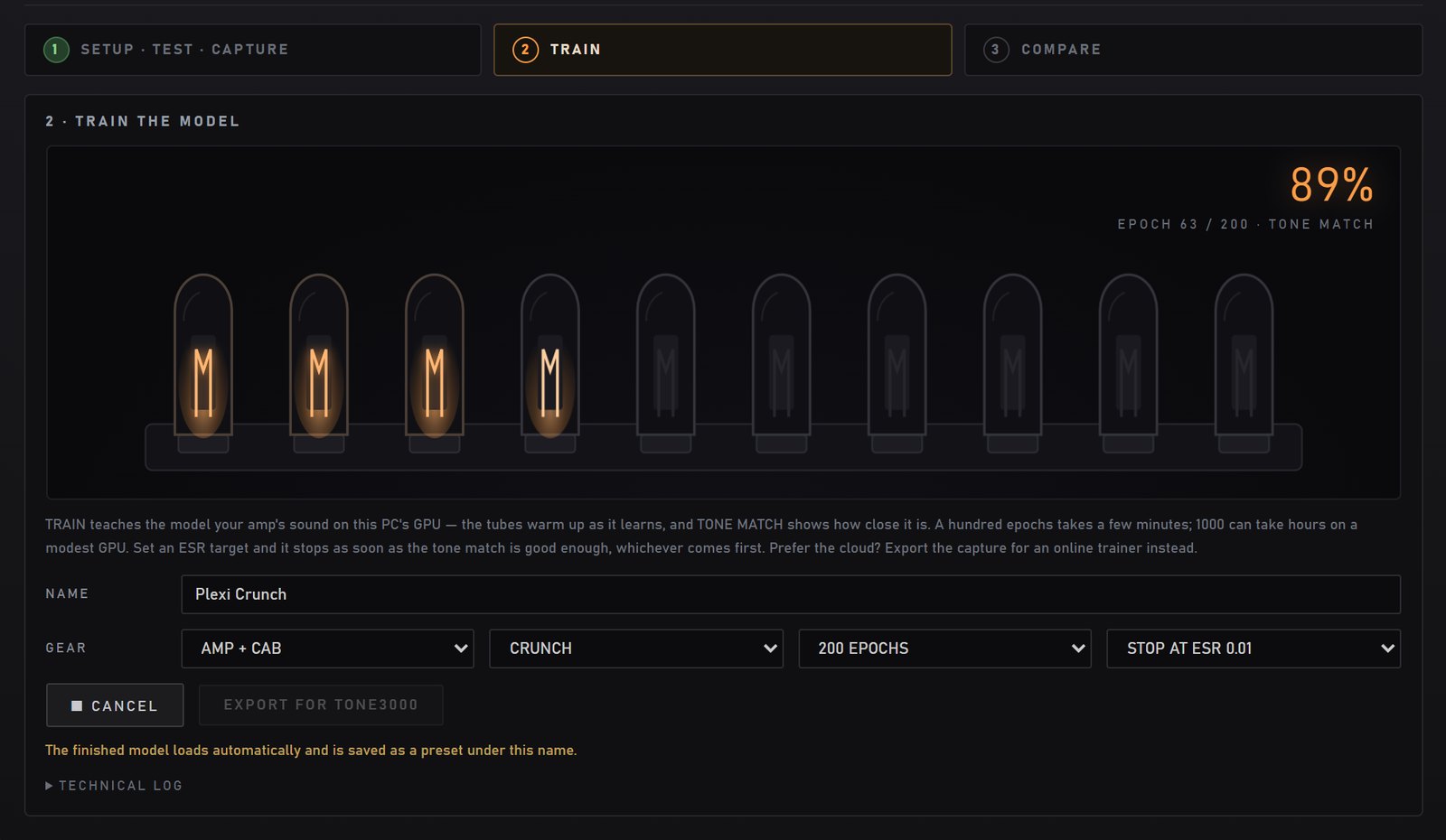
While it trains, the tubes warm up and TONE MATCH climbs; the epoch counter shows how far along it is. When it's done, the new profile loads in the amp slot and is saved as a preset under the name you gave it. The technical log under the buttons holds the trainer's own output — the first place to look if a run stops.
4Compare
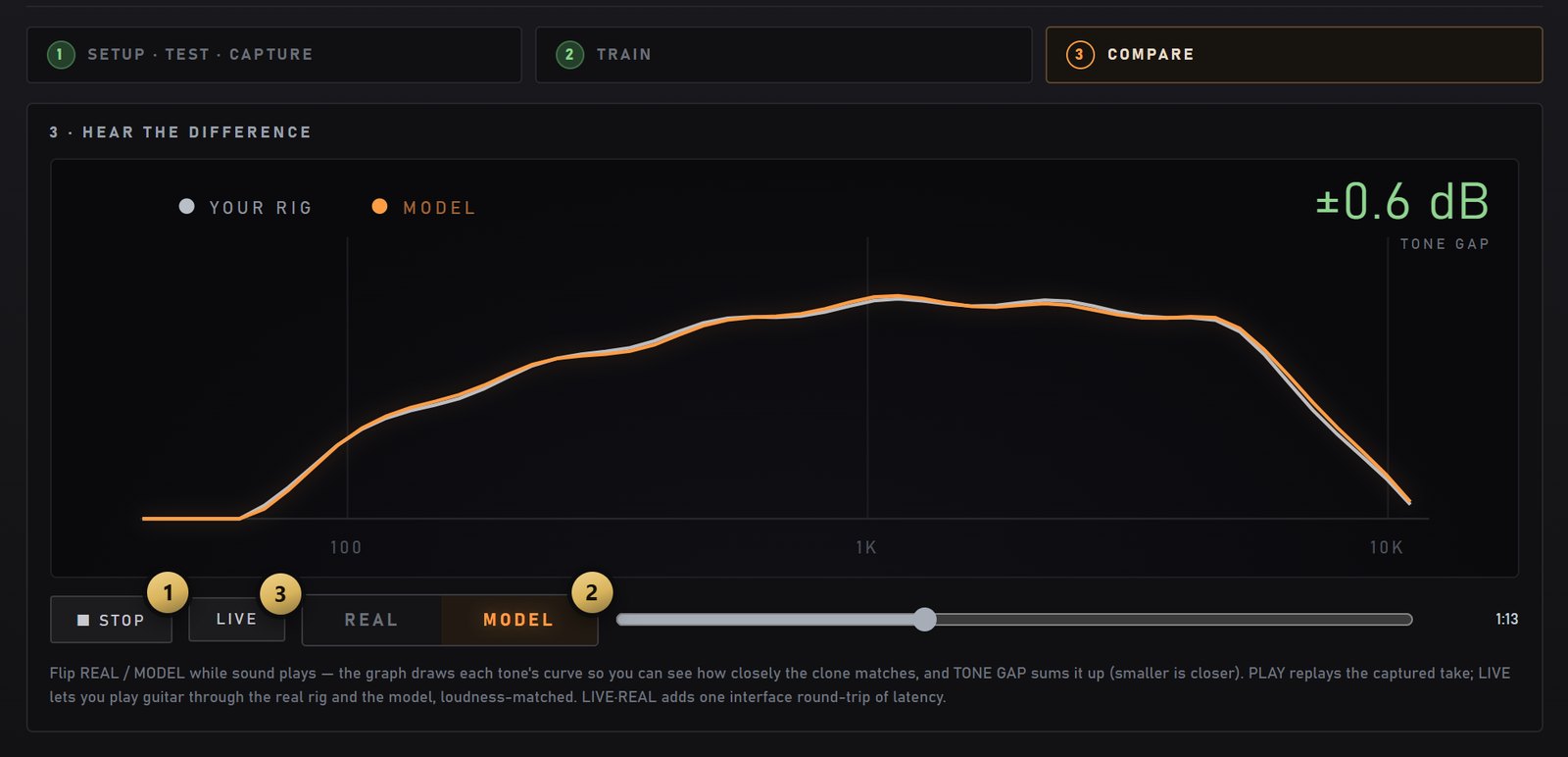
PLAY replays the take you recorded (STOP while it plays).
REAL / MODEL flips between your rig's recording and the clone while it plays. The graph draws both tones and TONE GAP sums up the difference — on a good capture the two curves sit on top of each other, as they do here.
LIVE lets you play your guitar through the real rig and the clone, loudness-matched, and flip between them. It needs capture I/O set to their own channels (not MAIN), different from the ones you play through.
No NVIDIA GPU? Train in the cloud
Local training needs an NVIDIA GPU — but you don't need one to capture. Record as above, then click EXPORT FOR TONE3000: the app saves your recording alongside the standard input file and opens tone3000.com/capture, where you upload both and train in the browser for free. Download the finished .nam and load it straight back into NAM 9000. On a Mac the page is labelled CLOUD TRAINING and this is the standard path.
Render Rig: clone a NAM 9000 rig PRO
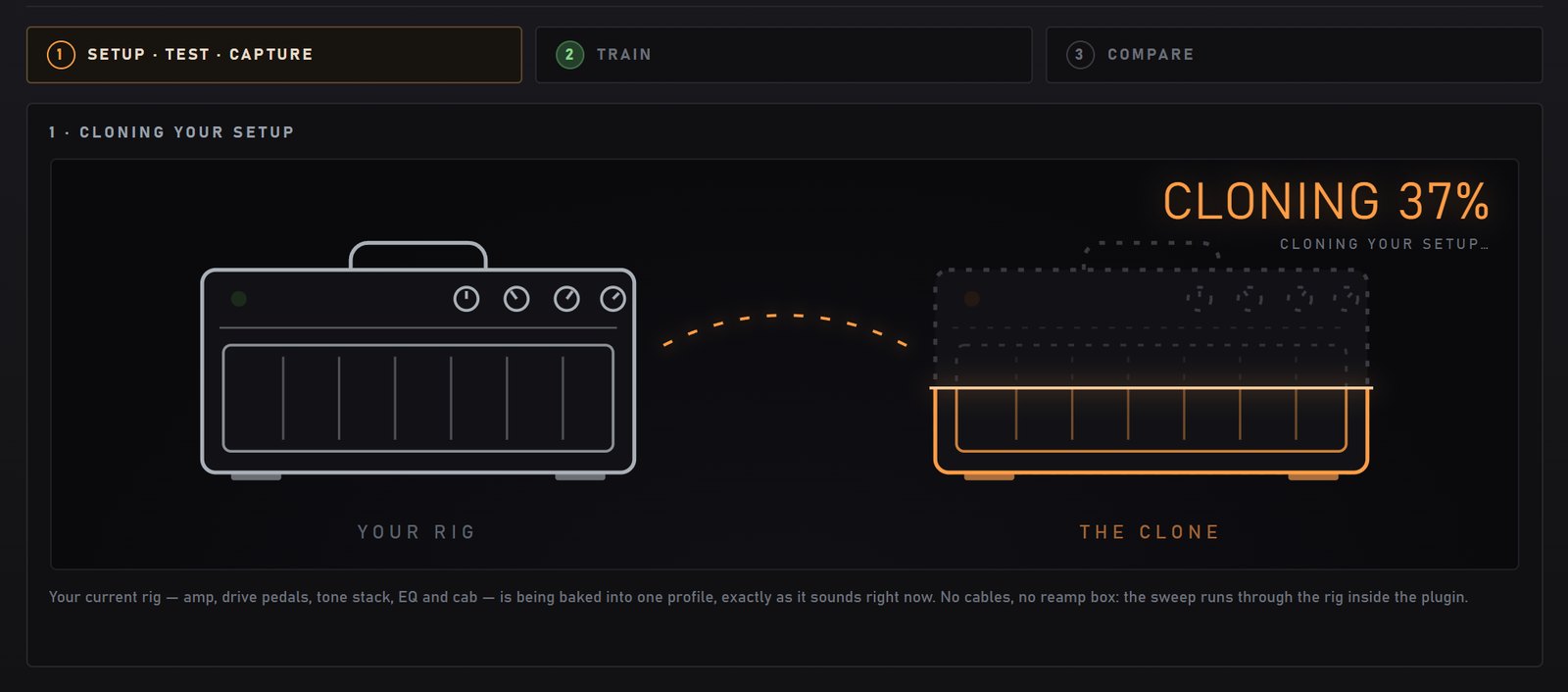
To turn a sound you dialled inside NAM 9000 — amp, drives, tone stack, EQ and cab — into one standard .nam, you don't record anything: Render Rig runs the capture signal through the rig inside the app. No interface, no cables, no reamp box. Use it to take a sound to a NAM hardware player, or to share it as one file.
Dial in the sound, then click the Render Rig icon in the top-left toolbar.
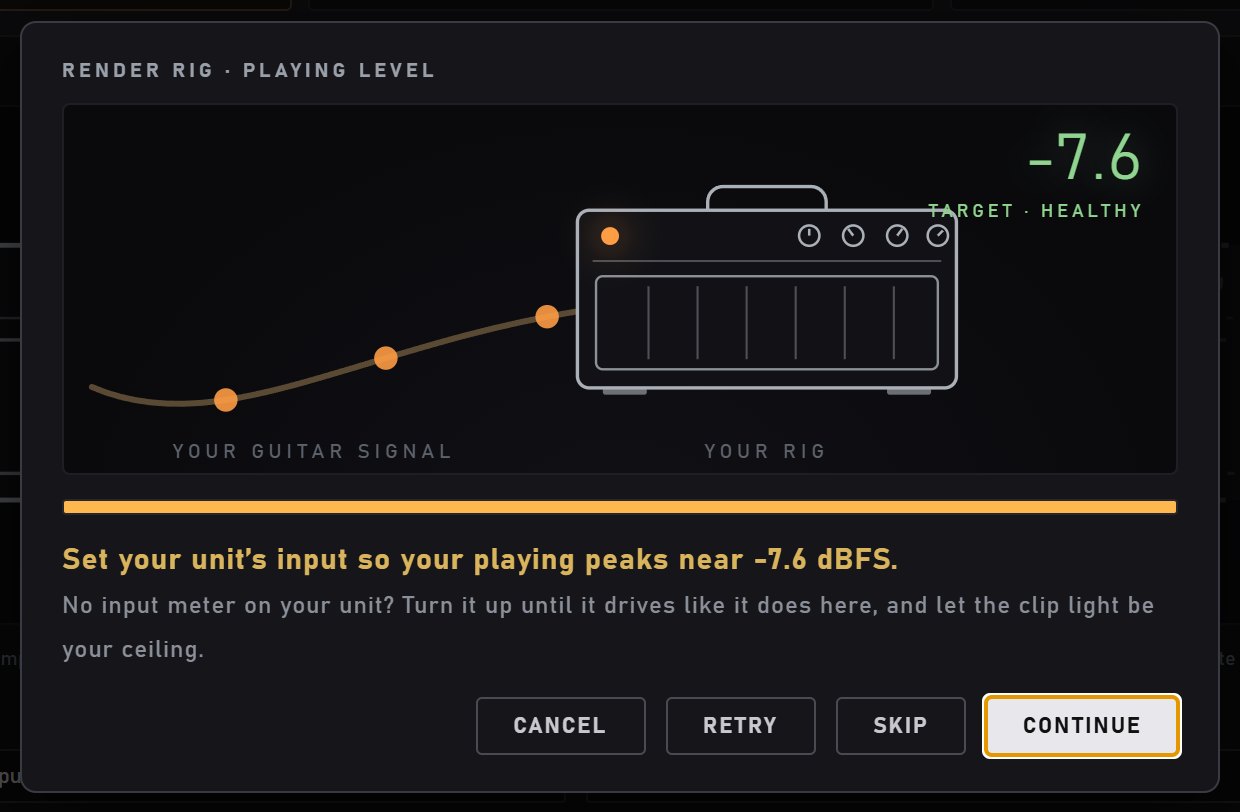
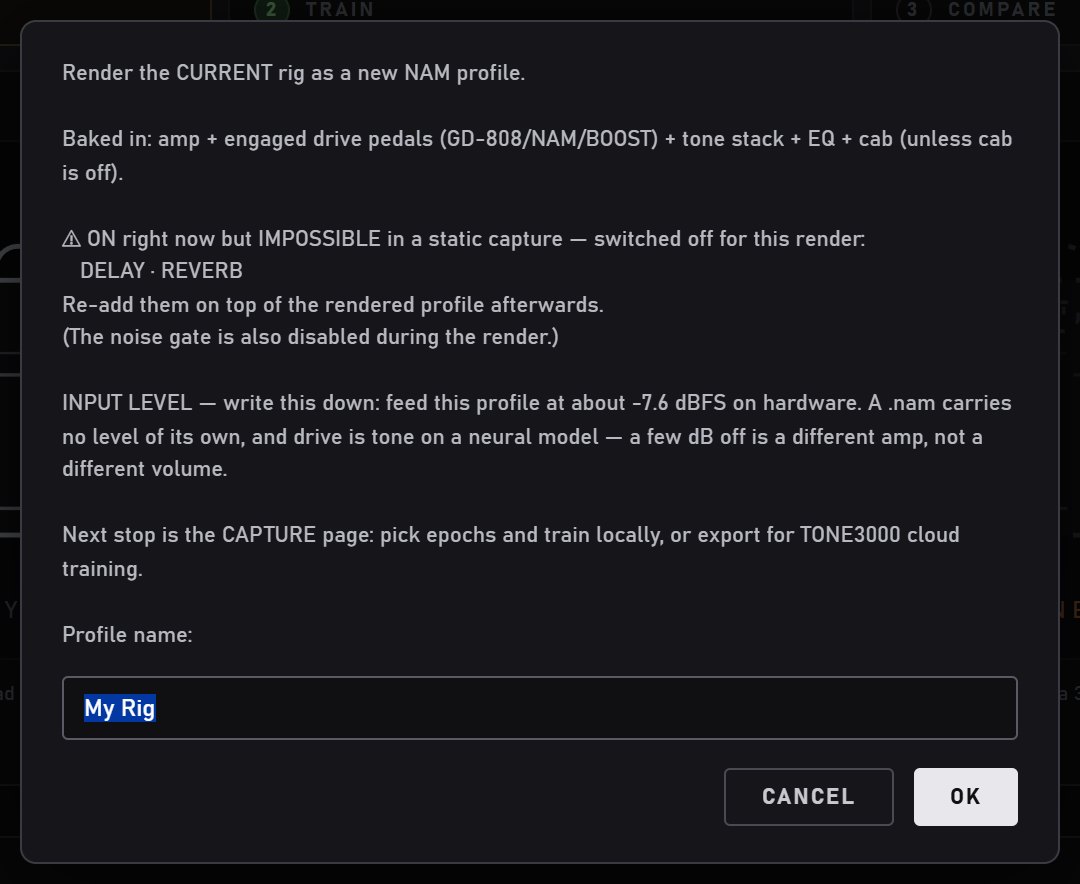
Play for a few seconds. NAM 9000 measures how hard you play and gives you a target for the hardware unit's input: a .nam carries no level of its own, and how hard you drive a neural capture is part of its tone.
Name it. The prompt lists what gets baked in and what can't be: delay, reverb, modulation and other moving effects are switched off for the render (a capture is static), and so is the noise gate — add them back on top of the finished profile. Write down the input level it gives you.
It clones the rig — the progress shows in the corner — then opens the TRAIN step: train it exactly like a capture, or export it for TONE3000.
A GAIN-sweep amp is rendered at the knob position you hear, and a multichannel head renders the lit channel — save a preset per channel for the rest. A dual-amp rig exports two files: see Dual rig.
Export a preset for hardware PRO
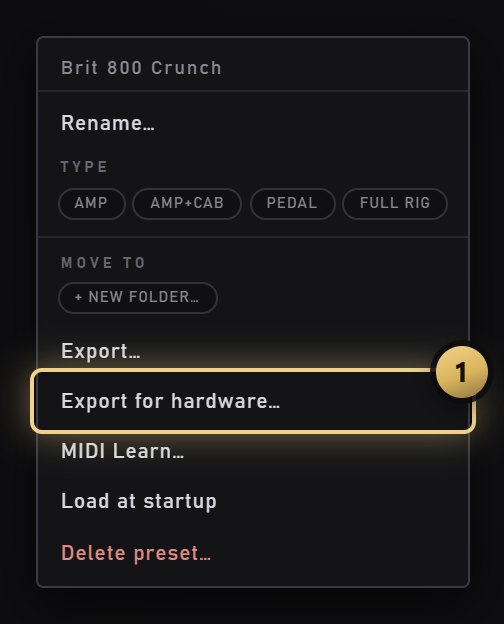
A bare profile is an ingredient, not a sound: it does not know which channel, which gain position, which drives or which cab you dialled. So the thing worth exporting is the preset. Right-click any preset in the library → Export for hardware… and the app loads it, measures your playing level and tells you what to set on your unit, then renders the whole rig and trains it into one .nam — the same steps as Render Rig. Your own plain captures still export directly on every edition (right-click the profile); purchased pack content cannot be exported on its own, only dialled into a preset and exported that way.
Troubleshooting
What you see
What to do
TEST shows ✗ NO SIGNAL or ✗ TOO WEAK, or the INPUT meter doesn't move
Nothing (or very little) comes back on the input you picked. Check that IN is the input your gear is actually plugged into (MAIN = the app's normal input), that the cable runs from the load box line out, mic or pedal output into that input, and that the input gain is up. In the standalone's Options → Audio/MIDI Settings, make sure Mute audio input (Feedback Loop) is off.
Training stops at once: No response activated the trigger in response to input spikes / cannot automatically analyze the latency
The recording came back silent, so the trainer can't find the start of the capture signal in it. Same fix as NO SIGNAL — run TEST until it shows ✓, then record again.
⚠ CLIPPING or ⚠ RECORDING CLIPPED
The return is too hot. Turn down the interface's input gain (or the load box or mic level) — not the amp, which would change the tone you are capturing.
⚠ NOT REPEATABLE
Your rig answered differently to the same burst twice. Switch off delay, reverb, modulation, tremolo and noise gates on the amp and pedals: a capture has to be static.
⚠ NOISY
Hum or hiss on the return. Check cables and grounding, and the gain staging between the load box or mic and the interface.
Training stops with Failed checks!
The take failed NAM's consistency check — usually a glitch during the recording: a crackle, a switch moved, a gate opening. Record it again.
The page says the trainer isn't installed
Local training needs Windows and an NVIDIA GPU: re-run the installer → Custom → Local GPU training. Otherwise use EXPORT FOR TONE3000.
The clone sounds different from the amp
Compare REAL and MODEL first: if the curves sit on top of each other, check your monitoring rather than the capture. If they don't, check the GEAR type — a capture with a cab in it should play with NAM 9000's own cab off — and try more epochs or a lower ESR target.
Screens show example values. Still stuck? Open the technical log under TRAIN, and send it with a description to hello@nam9000.com.
12 · Library & TONE3000
Thousands of tones, organized your way
A browser for your profiles, cabs and presets — searchable, sortable, and yours to organize into groups — plus the whole TONE3000 library built right in.
The browser — tabs for profiles, cabs, presets and TONE3000; groups down the left, filters up top.
Groups — make your own shelves
A library of thousands is only useful if you can carve it up. Any profile, IR or preset can live in a group of your making, and the browser renders them as collapsible folders with counts:
Create a group as you file something into it — right-click any item, pick MOVE TO → + new folder…, name it, done. There is no separate "make a folder" step, so you never end up with empty shelves
Move a lot at once: Ctrl-click to pick items, Shift-click for a range, then right-click → MOVE TO — the menu shows how many you're moving and lists every group you already have, plus (no folder) to send them back to the root
Or just drag — grab a row and drop it on a group header
Right-click a group to rename it, or delete it — deleting a group only dissolves the shelf, the files move back to the root untouched
Drag files in from your desktop: drop .nam, .wav IRs or preset files straight onto the browser and they're imported and filed. Delete (or Backspace) removes what you've selected, with a confirm — profiles and IRs are kept in a _removed folder, so only preset deletion is final
Groups are real folders inside your library, so anything you organize in the app is organized on disk too. Factory content stays read-only.
Finding things fast
Sort by A–Z, by amp (grouping every scene of one amp together regardless of where it lives), by brand, by tone — clean/crunch/high-gain — or by gain set, which expands a sweep into its individual capture points
Filter pills: favourites (★), USED / UNUSED (is any preset referencing this profile?), GAIN for sweeps, MULTI-CH for multichannel heads, plus category pills like AMP, AMP+CAB and PEDAL
Badges tell you what a row is at a glance: FULL (amp + cab), AMP (amp only), PEDAL, a gold knob + GAIN for a sweep, steel 3 CH for a multichannel head, and 5 MIN on a free preview
Hover a preset and a card shows exactly what is inside it — amp, cab, pedals, rack — before you load it. The gold marker shows what is playing right now
A sweep collapses into one row, not fifteen: you load the amp, not a pile of capture files
TONE3000 — sign in once
Connect your free TONE3000 account from the TONE3000 tab: a browser tab opens for sign-in, you approve, and this computer stays connected. No API keys to paste any more
Browse and download amps, pedals and full rigs without leaving the plugin — each routes itself to the right slot
IRs too: pull cabinet and room impulse responses straight into the CAB slot, and right-click any tone to see more by the same creator
13 · Dual rig PRO
Two full amps, two cabs, one plugin
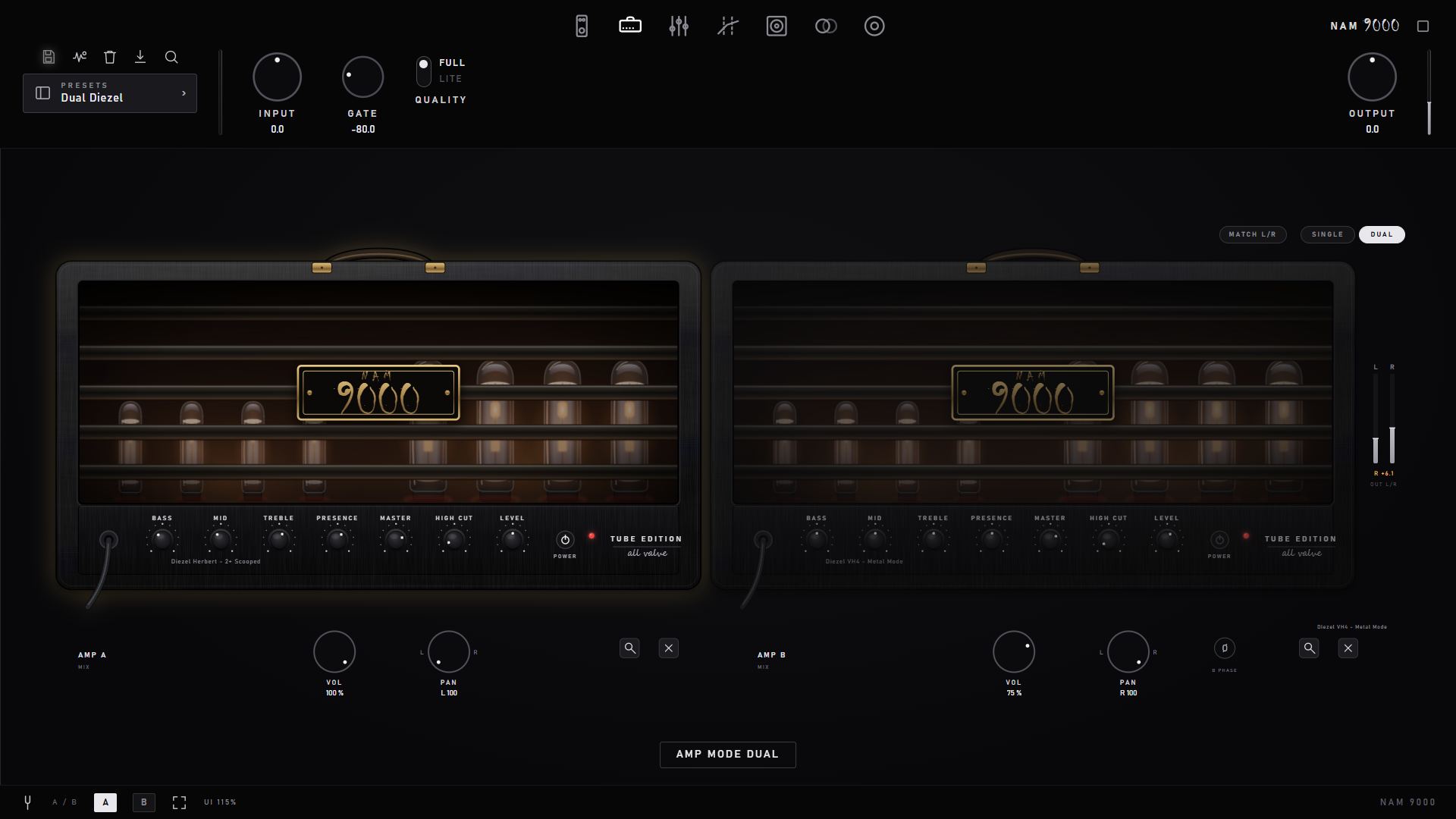
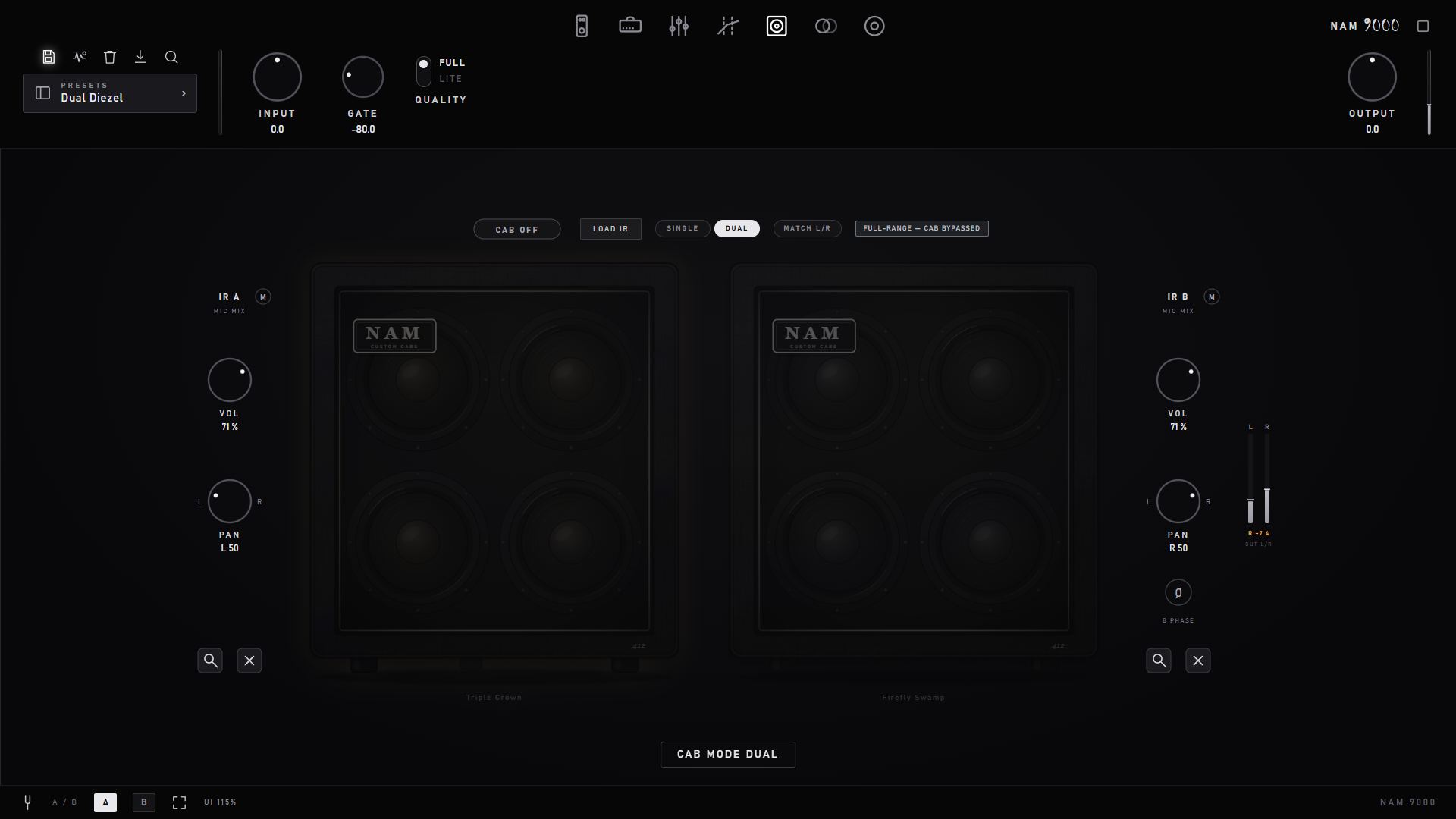
Run two independent amp captures in parallel, each with its own mix panel, and blend two cabs — a two-mic blend on one amp, or a full cab per amp.
Dual amp rig — a level/pan/phase mixer under each head.
Dual cab — two-mic IR blend with per-mic level, pan and phase.
The plugin is mono-in by design; the stereo image is created intentionally inside the box. Engaging dual mode pans the two amps hard left and right by default — the right way to run a dual rig (a wide, dimensional tone, each amp on its own side). Summing two amps to the centre instead phase-cancels the low end, so the plugin warns you if both land near centre or if the two captures have different native sample rates.
Why a dual rig is panned, never summed — the measurements
Two nonlinear amp captures must never be summed onto one channel. We measured it on the real audio engine (the internal DspProbe --dual harness, driving the actual mixer with noise and reading back the spectrum) and found two independent things go wrong when two amps share a channel:
Low-end phase cancellation. Two different captures partially cancel where their phase disagrees — measured at −16 dB at 80 Hz and −4 dB at 120 Hz. That hollowed-out low end is the classic "thin dual" tone. It happens at any pan while both amps share a channel, and a mono sum can never escape it.
Midrange comb filtering. Every capture carries its own native sample rate; two branches at different rates end up a few samples apart in time. Summed, that comb-filters the 1–6 kHz midrange by 30–50 dB — a phasey, hollow mid on top of the thin bass.
Panned hard left and right, neither mechanism can fire: each amp lands on its own channel, so there is nothing to cancel or comb against. Measured that way each side is identical to that amp running solo (0.0 dB difference across the spectrum) — the second amp adds stereo width and depth, not a tonal fight. That is why the plugin spreads the amps hard L/R the instant you go dual, nudges you with a warning if they drift back toward centre, and — as below — renders a dual amp rig to two separate files rather than one blend.
Render Rig — what a dual rig exports
Render Rig bakes the live rig into a standard .nam. Because a .nam is mono in and out, what it writes depends on the rig:
Single amp → one profile, as before.
Dual amps → two profiles, "…L" and "…R" (one per head). Each is rendered in isolation — no summing, and no pan baked in — so the two files stay clean. Load them back into a dual rig, or into two slots of NAM-compatible hardware, and the exact stereo tone survives: no width lost, nothing cancelled.
One amp through dual cabs → one profile. Cab convolution is linear, so a two-mic IR blend bakes cleanly into a single file — exactly how commercial blended IRs ship. (A dual amp and dual cab still splits L/R, each head taking its own cab.)
IR alignment — automatic, plus a fine trim
Blending two IRs has its own classic failure mode: every IR carries its own leading dead time (mic distance, processing padding), and two IRs whose impulses don't land at the same instant comb-filter when summed — the same hollow sound, from the cab side. Hardware modelers ship an "align" control in their cab blocks for exactly this reason.
NAM 9000 handles it in two layers:
Automatic onset alignment (everyone). Every IR is scanned at load and shifted so its impulse starts at the exact same position. Two IRs that would have combed — measured on our engine, a 37-sample offset notches the blend by −21 dB — sum to a 0.0 dB-ripple flat blend after alignment. You never touch anything.
ALIGN micro-delay (Pro). A ±2 ms knob on the IR B rail nudges one mic against the other (positive delays B, negative delays A) — the by-ear fine trim for creative mic-distance effects or IRs whose tonal centers sit later than their onsets. Sample-accurate, verified against the theoretical comb positions.
If a blend still thins out, the per-mic phase button (Ø) flips polarity — alignment fixes timing, Ø fixes polarity; together they cover both ways two mics can fight. All of it applies before Render Rig bakes a blend, so exported profiles are phase-true too.
14 · MIDI control
A controller, a footswitch, and no mouse
Built for the standalone app: right-click anything, pick MIDI LEARN, move the control on your controller. Free in both editions.
Any control — right-click a knob, switch, fader or pedal → MIDI LEARN → move the control you want it on. The banner names what you're learning; ESC cancels.
Footswitch actions — amp channel + / − and channels 1–8 as direct slots (amp B has its own set in a dual rig), scenes 1–10 and scene + / −, the STAGE view toggle, the PEDALS and RACK master switches, preset + / −, tuner, A/B and tap tempo. Learn them from the ACTIONS list in the MIDI panel, or by right-clicking the control that already does the job — a multichannel head's own channel buttons, for instance. They fire on the press, so a switch that sends 127 then 0 acts once, not twice.
One CC per preset — right-click a preset in the library and learn it. The preset's amp comes in with it.
Program Change — #1 is the first preset by name, #2 the second, walking the same order as PRESET +/−. It ships off: a CC you mapped only touches what you put on it, while a program change acts on whatever arrives.
The panel — under the settings gear: on/off, the MIDI channel to listen on (OMNI by default), a live monitor of incoming messages, every mapping with an ✕ to forget it, and CLEAR ALL.
Your mapping belongs to the machine, not to the tone — it lives in midi_map.json beside your library, and presets never carry it. A DAW project keeps its own copy, so reopening a session restores the mapping it was built with.
In the standalone, tick your controller under Options ▸ Audio/MIDI Settings first — the panel tells you when it hasn't seen any MIDI yet.
In a DAW, use your host first
This is honest advice rather than a limitation: your host can bind a CC to any plugin parameter and record it as automation, which plugin-side MIDI cannot. What the plugin adds in a host is the half automation can't reach — switching amp channels and loading presets from a footswitch. In Logic the AU receives no MIDI at all: the only way to give an audio-effect AU MIDI input is to change its type, which would have made every saved Logic project open with the plugin missing. That trade wasn't worth making. Use Smart Controls or automation in Logic, and the standalone when you want feet on it.
15 · Presets & packs
Save your own, or start from ours
A preset stores the whole rig — every pedal, the amp, both EQs, the cab and the time FX — as one recallable channel strip. Share them as bundles, or unlock curated packs.
Saving and recalling
The preset chip is the whole workflow: it names what you're on, shows a dot once you've changed anything, and its menu holds UPDATE, REVERT TO SAVED, SAVE AS NEW… and your recent presets
Loading a profile or cab keeps the preset name and just marks it dirty, so UPDATE and REVERT always have something to aim at — and the app never opens on "no preset"
A preset also remembers the multichannel head it was built on, so the right amp face and channel come back with it
Export any preset as a shareable bundle from its right-click menu
Preset packs
Optional paid packs add curated, mix-ready tones. Each hero pack ships every amp twice — the finished full rig (cab baked in) and an amp-only "DI" profile to pair with your own cab or IR — plus that amp's continuous GAIN sweep, 16 to 31 real captures across its gain range on one knob. Multichannel amps are a pack of their own: a whole head with working channel switching, and one is included with Pro. Unlocking is fully offline: paste your license key into the in-app Unlock dialog. No account, no activation server.
Unlocking what you bought
Your license key arrives by email within a minute of ordering, and it is also attached as a .namlicense file. Everything below happens in the plugin's browser panel — there is no website login and no activation server. Keys work offline, never expire, and stay valid on every machine you own.
Look for the gold UNLOCK PACK button under the preset name, top-left. That is the one place keys go in — for packs, pedals, multichannel amps and Pro alike.
Drive pedals and multichannel amps are one step: paste the key, play. Pedals already ship inside NAM 9000, so there is nothing at all to fetch — before you buy, one plays for 30 seconds at a time marked PREVIEW, and your key simply stops the clock. Multichannel amps are far too large for the installer, so the app fetches the head once by itself the first time you play it — as a single download for the whole amp, all channels — and keeps it. Unlocking one turns the audition into ownership: the browser row gains a YOURS badge, the five-minute clock never appears again, and the amp is there after a restart, offline.
NAM 9000 Pro is the same routine: paste the key and the Pro features light up in the free app. Pro also includes the five NAM 9000 house amps — Vintage, Wreck, Hot Rod, Modern and Brutal — unlocked by the same key (1.20 or newer; each downloads the first time you load it). Pro orders placed before 1.20 came with a personal one-time code for one multichannel amp; those codes keep working.
Amp and preset packs are the one case with two steps, because a pack is a file. Download the .nampack from the link in your email, click INSTALL .NAMPACK in the browser panel and choose it, then click UNLOCK PACK and paste your key. (Buying a multichannel amp gets you its pack as an optional bulk download too — handy for a studio machine that is kept offline — but you never need it.)
On builds before 1.8.1 the button is instead a small UNLOCK pill in the filter row under the browser's search box — easy to miss, which is why it moved.
Keys are personalized with your email address, which is shown to anyone who activates them. Please don't share them.
The Amp Room shows the whole NAM 9000 collection in 3D at real size — amps, cabs and pedals — and holds two builders: design your own amp and cab, name them, and send them to NAM 9000, where they play as their own amp face. New in 1.25, and a beta: an early version that grows from your reports and feedback.
What it is — and isn't. The Amp Room is a visual tool. A build changes how your rig looks, not how it sounds: the sound is the captured amp you build on (the "heart") and the cab IR you choose, exactly as when you load them yourself.
The room is an option in the installer — Amp room (beta), ticked by default, about 140 MB. Right after installing, the installer runs a short graphics test and picks a quality setting (HIGH, MID or LOW); a computer without 3D graphics gets the room as pictures, or a note that it can't run it — everything else in NAM 9000 works as normal. No room icon in the top bar? Run the installer again and tick Amp room (beta).
Opening it
Click the amp icon at the top right of NAM 9000 (the first few times a gold bubble points to it): Open the Amp Room, Build an amp or Build a cab. The room opens in its own window. Pick any piece to look at it close up, open it, or take it apart; GRAPHICS in the room's header sets the quality and runs the test again.
Build an amp
Start from any amp in the room (its own cabinet, chassis and face, ready to re-dress) or a classic head style built from scratch.
The heart — the captured amp that makes the sound: an amp you own, your own captures or any .nam file; store amps can be auditioned. Most amps come as full rig (with their cab) and DI (the amp alone, for a cab you choose or build).
Dress it — size in real millimetres, the front (six styles, or the front of any head in the room), covering (tolex or hardwood, any colour, two-tone), grille, plate, knobs, your own badge text, handle, corners and piping. Every knob on your face does something real.
Send this design to the app on the review step. It asks for a name first if it has none. NAM 9000 loads it right away: your face on the console, your name in the preset window.
Build a cab
Build a cab works the same way: a cabinet family, the speakers (they set the box and which impulse responses fit), covering, grille cloth, corners, piping and badge, then the impulse response — the sound of the cab. Send this cab to the app loads its face and IR into the cab slot.
Your creations in NAM 9000
Everything you send is kept as a file in your library (User › Creations › Amps and Cabs) and listed on the AMPS and CABS pages under the CREATIONS pill — click one to play it. Send a build again with the same name to update it. Inside the room, Keep in Your creations saves a design to come back to (three in the free edition, any number with Pro or Premium).
17 · Help
Report a problem — from inside the app
Settings popover › DIAGNOSTICS › REPORT A PROBLEM. Write what happened — and your email if you want an answer — then press SEND.
The report carries what support always needs: your OS, CPU and memory, graphics card and driver, NAM 9000's version, edition and audio settings, the ids of the packs you own, and — if Include the logs stays ticked — the end of this session's log and the one before.
Your user folder is shortened to "~" and email addresses in the logs are taken out. WHAT IS SENT shows the report before it goes.
Nothing is sent until you press SEND. You get a number like R-7KQ2MX; quote it if you write to us about the same problem.
No connection? It says so and offers COPY INFO, to paste into a mail to hello@nam9000.com.
How reports are handled and kept: privacy policy, section 5a.
 Manual · Feature Tour