Practise right next to your rig. The Scale Guide, explained.
NAM 9000 has a practice window built in: scales and chords on a neck in your tuning, a chord trainer that listens to you, and YouTube backing tracks. It is free for everyone. The TAB trainer is part of NAM 9000 Pro.
The Scale Guide walkthrough, 3:58. Plays from YouTube. Nothing loads from YouTube until you press play. Watch on YouTube
It is one window on top of the app, so your amp, pedals and tuner keep running while you practise.
The fretboard icon in the bottom bar, right next to the tuner.
Click the fretboard icon in the bottom bar, next to the tuner. Click it again, the X, or press Esc to close.
It has three modes along the top: SCALES, CHORDS and TAB.
Drag the corner to make it bigger or smaller. On a laptop, press F (or the button next to the X) for a full-window view.
Your key, scale, tuning, progressions and tracks are saved on that computer. They are not part of your presets.
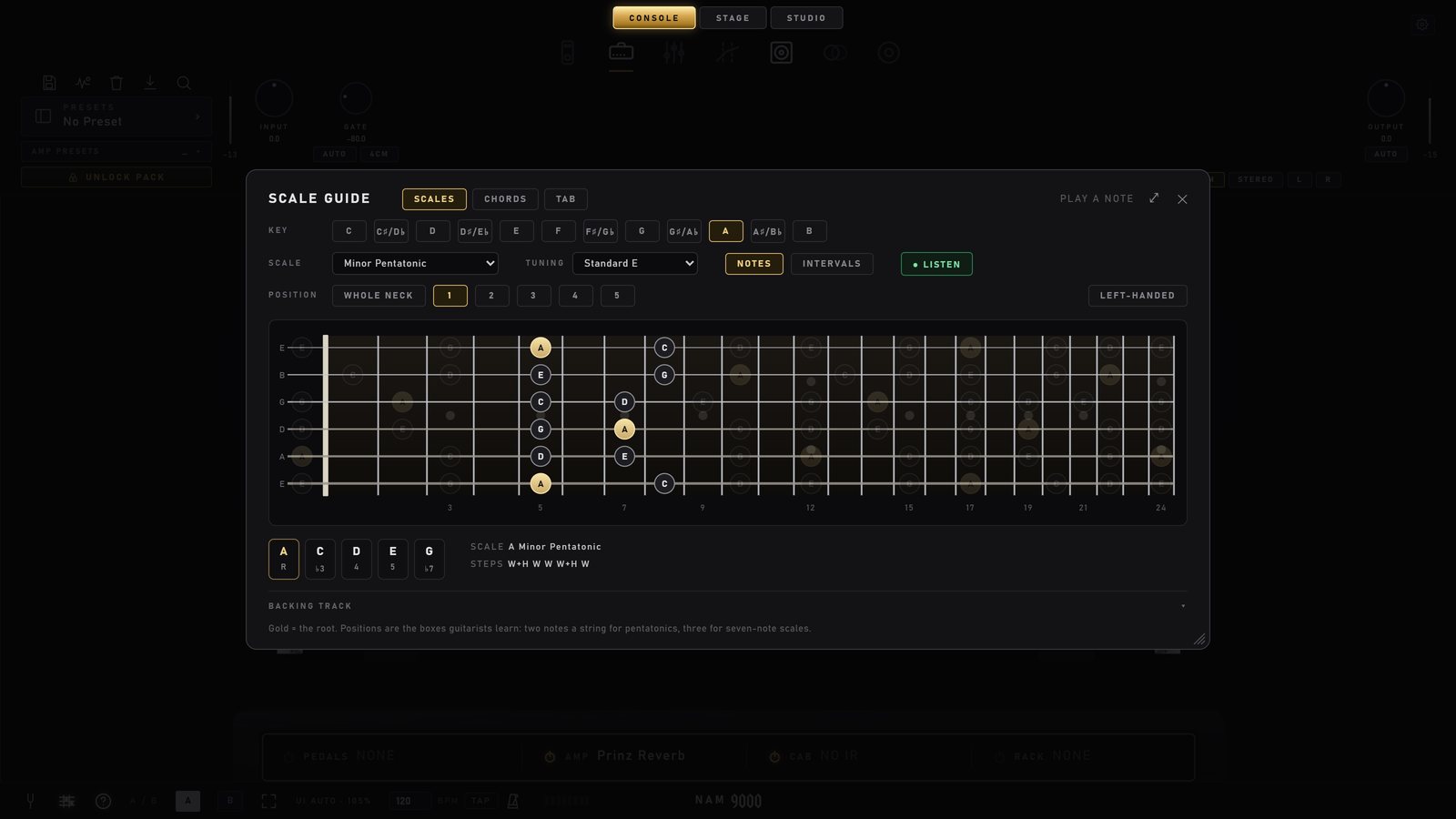
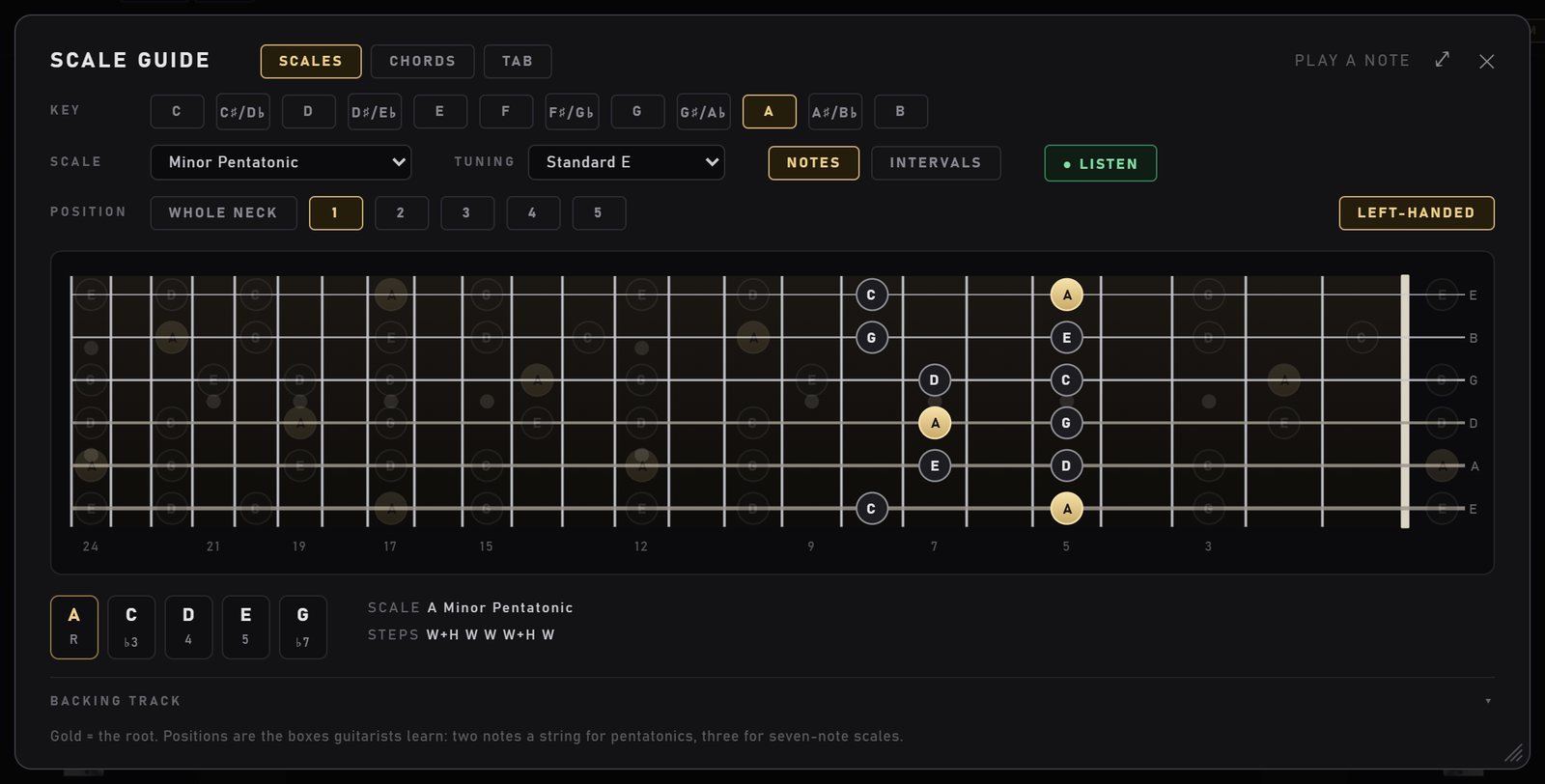
The guide sits over the rig. Here: A minor pentatonic, position 1, in standard tuning.
SCALES FREE
See any scale on a 24-fret neck, in your tuning, one box at a time or across the whole neck.
Key, scale and tuning
KEY: all 12 keys.
SCALE: 22 scales in three groups. The common ones (major, natural minor, major and minor pentatonic, blues, major blues, harmonic and melodic minor), the five modes (Dorian, Phrygian, Lydian, Mixolydian, Locrian), and a metal and exotic group (Phrygian dominant, Hungarian minor, double harmonic, Neapolitan minor, Lydian dominant, Hirajoshi, whole tone and both diminished scales).
TUNING: 14 built in. Standard E, drop D, C and B, E-flat, D and C standard, 7-string B and 7-string drop A, 8-string F-sharp, DADGAD, open G, and 4- and 5-string bass. Or make your own (see MY TUNINGS below).
Under the neck you see the notes of the scale with their intervals and the steps (W and H). For seven-note scales it also lists the chords of the key.
Positions: learn the boxes
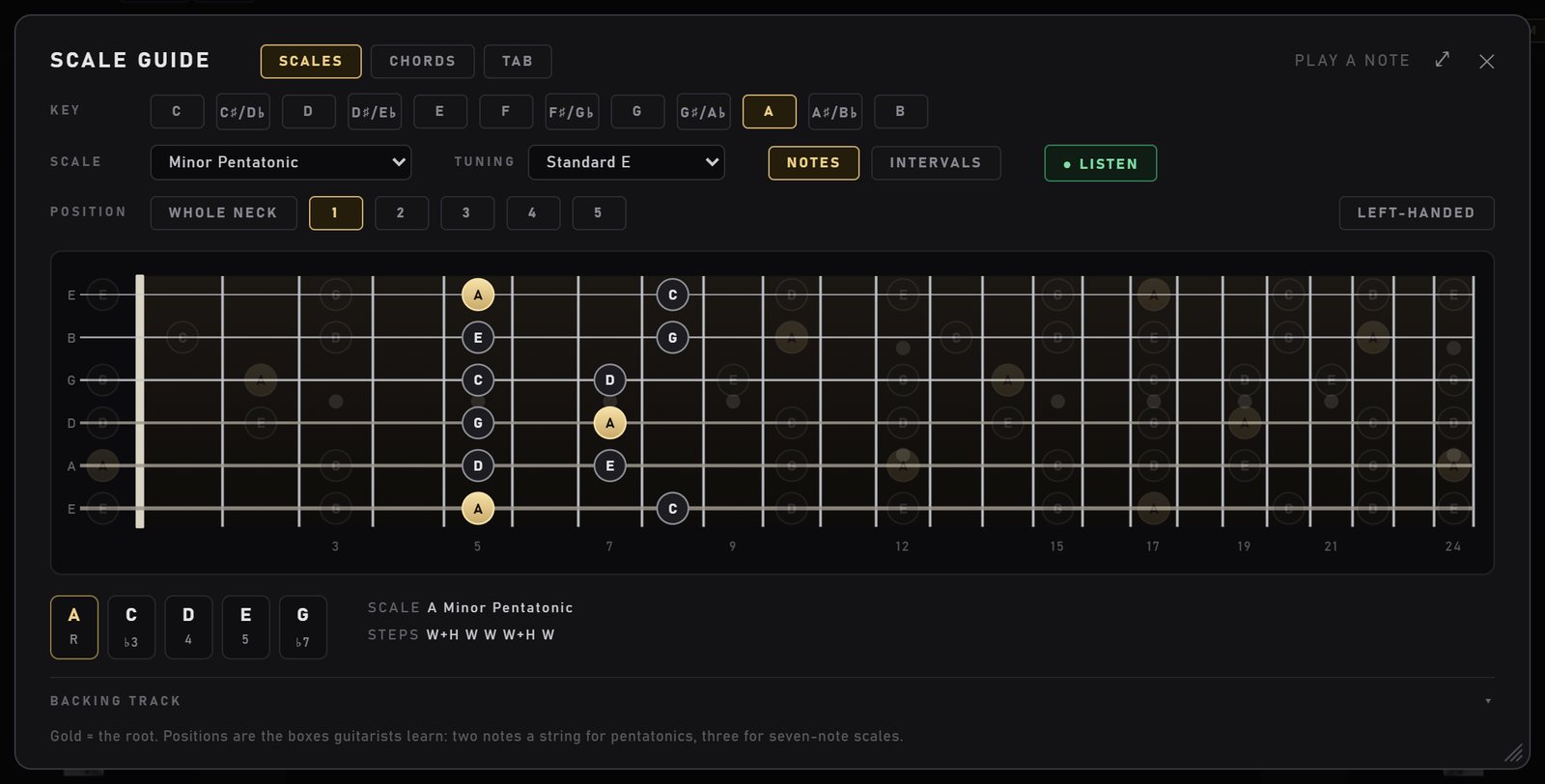
WHOLE NECK shows every note of the scale. The numbered buttons show one position at a time: the boxes guitarists learn, with two notes a string for pentatonics and three for seven-note scales. Gold notes are the root. The rest of the neck stays faintly visible, so you can see how one box joins the next.
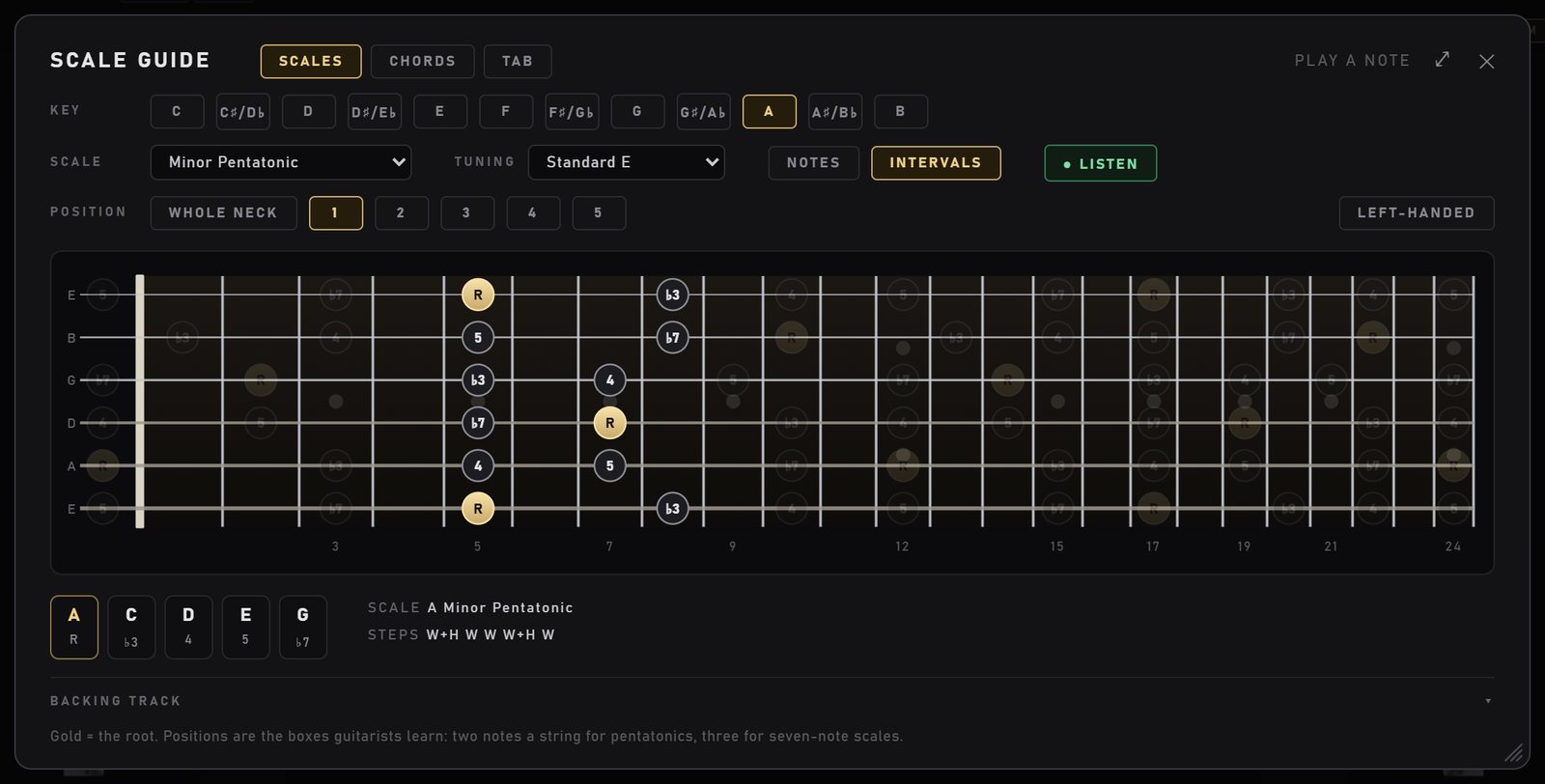
NOTES: the note names. Position 1 of A minor pentatonic, at the 5th fret.INTERVALS: the same box, labelled by each note's job (R, b3, 4, 5, b7).
Why intervals? Note names change with the key. Intervals do not. Learn where the root, the b3 and the 5 sit in a box, and you can move the box to any key and still know which note is which.
LISTEN: see what you play
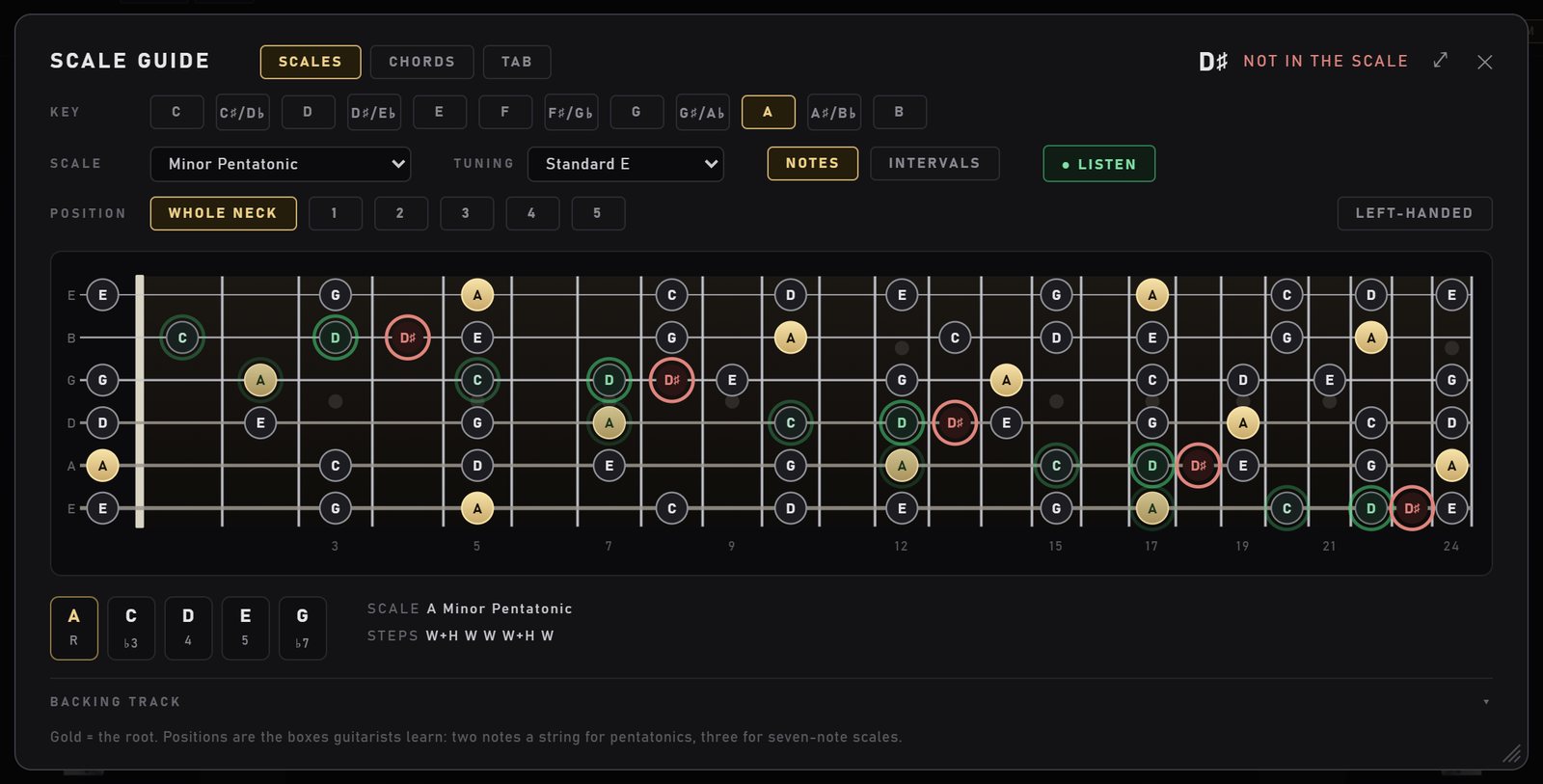
Turn on LISTEN and play. The note you play lights up on the neck: green when it is in the scale, red when it is not. The last few notes leave a short fading trail, so you can see a phrase as you play it. The top of the window names the note.
A few notes in the scale (green), then a D-sharp: red, and the top line says NOT IN THE SCALE.
7-string, 8-string, bass and drop tunings
Change the tuning and the neck redraws with the right number of strings and the right notes, and the position boxes are worked out for that tuning.
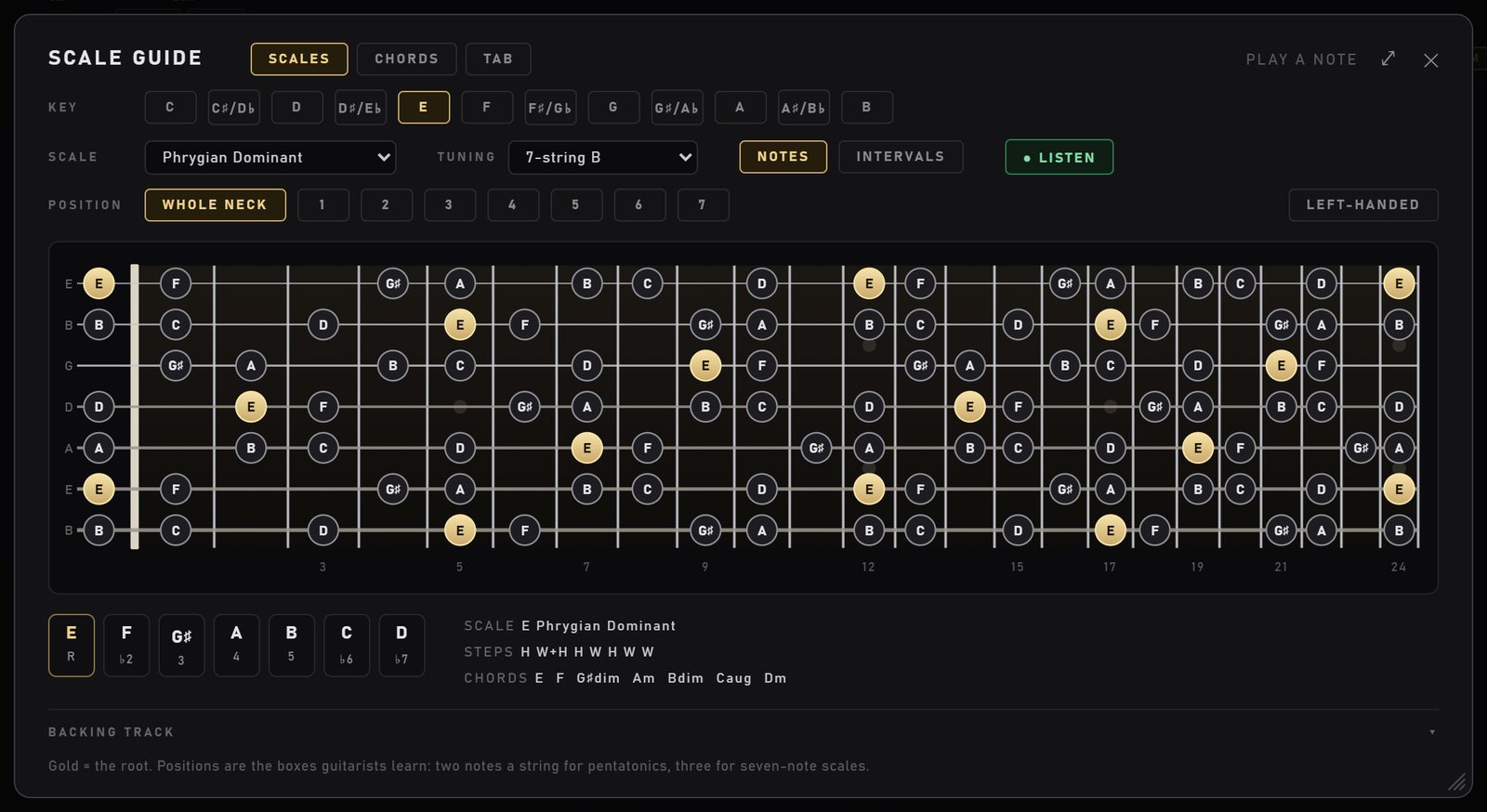
E Phrygian dominant on a 7-string, with the chords of the scale listed below.LEFT-HANDED mirrors the neck with the nut on the right. The text stays readable.
MY TUNINGS: your own tuning
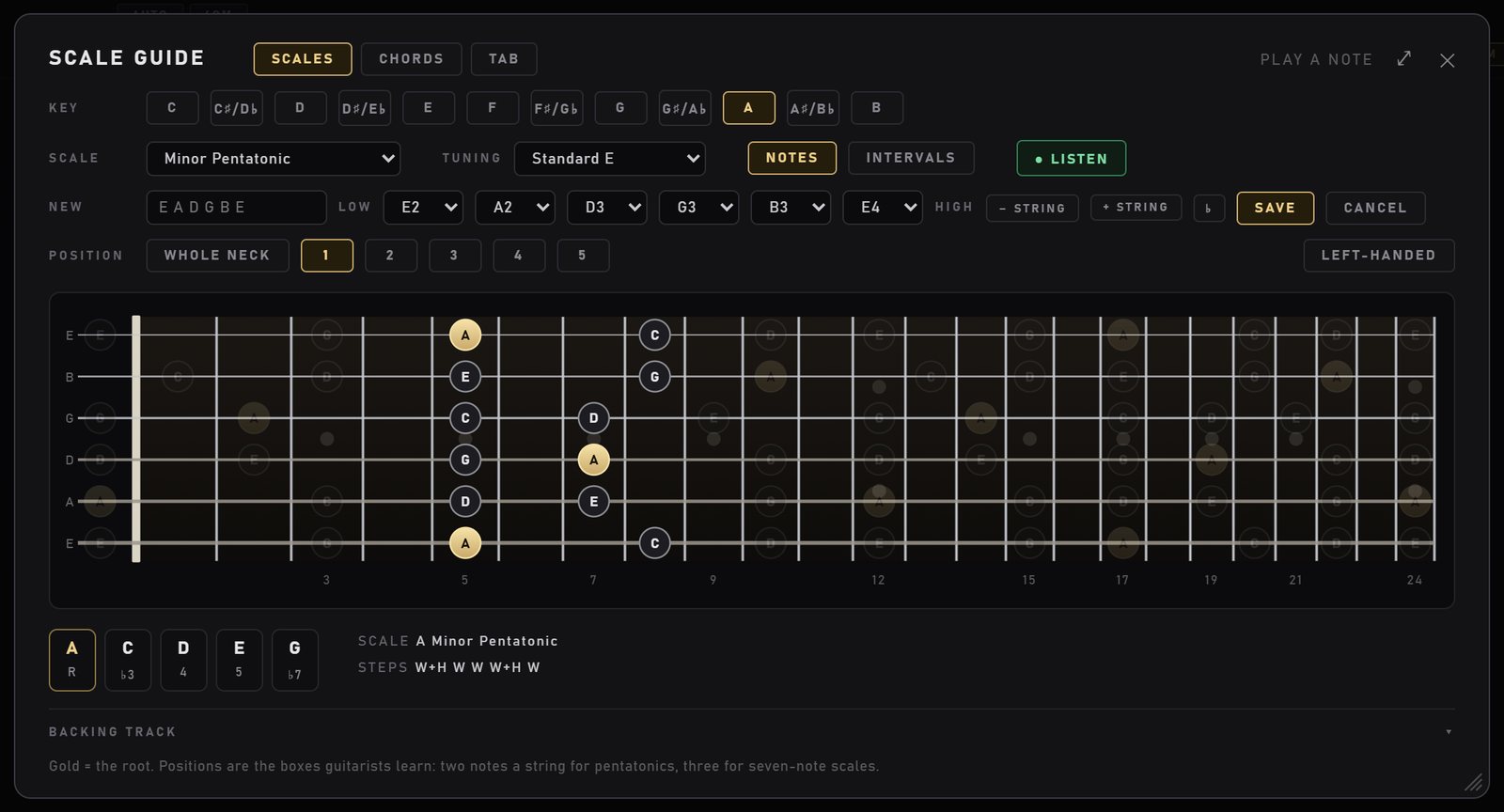
At the bottom of the TUNING list, + New tuning… opens an editor on the tuning you are using. Set 4 to 8 strings (- STRING / + STRING), pick each string's note and octave (A0 to E5), give it a name, and use the ♭ chip if you want the notes spelled with flats. SAVE puts it under MY TUNINGS. EDIT changes or deletes it later. It works in SCALES, CHORDS and TAB.
The tuning editor. Each string must be higher than the one below it, so re-entrant (ukulele-style) tunings are not supported.
CHORDS FREE
Playable chord shapes in your tuning, progressions in any key, and a trainer that listens and moves on when your chord rings clean.
Chord shapes up the neck
Pick a ROOT and one of 16 chord types: major, minor, power chord, dominant 7, major 7, minor 7, sus 2, sus 4, add 9, major 6, minor 6, dominant 9, half-diminished, diminished, diminished 7 and augmented.
SHAPE 1, 2, 3… step through playable shapes from the nut up. The shapes are worked out for the tuning you picked, so drop D or a 7-string get their own fingerings. ALL TONES shows every chord tone on the neck.
An × marks a string you do not play. Gold is the root. Under the neck: the chord's notes and its formula (for example R 3 5 b7).
Progressions
Switch PLAY from Single chord to a progression. There are 15 built in, and they follow the KEY you pick: pop (I V vi IV, vi IV I V), 50s, three-chord rock, classic rock (I bVII IV), 12-bar blues, minor blues, jazz ii V I, Canon, minor rock, epic minor, Andalusian, minor i iv v, and two metal progressions with power chords. A row of STEPS shows every chord with its roman numeral.
Make your own with + New progression…, then EDIT, SAVE or DELETE. Your progressions are saved on that computer.
The chord trainer
With LISTEN on, the guide listens to your strum. The meter shows how clean the chord is. When the current chord rings clean for about a fifth of a second, the trainer moves to the next chord of the progression. "Clean" means most of what it hears is the chord's own notes, each chord tone can be heard (the 5th may be left out of a bigger chord), and no other common chord fits what you played better.
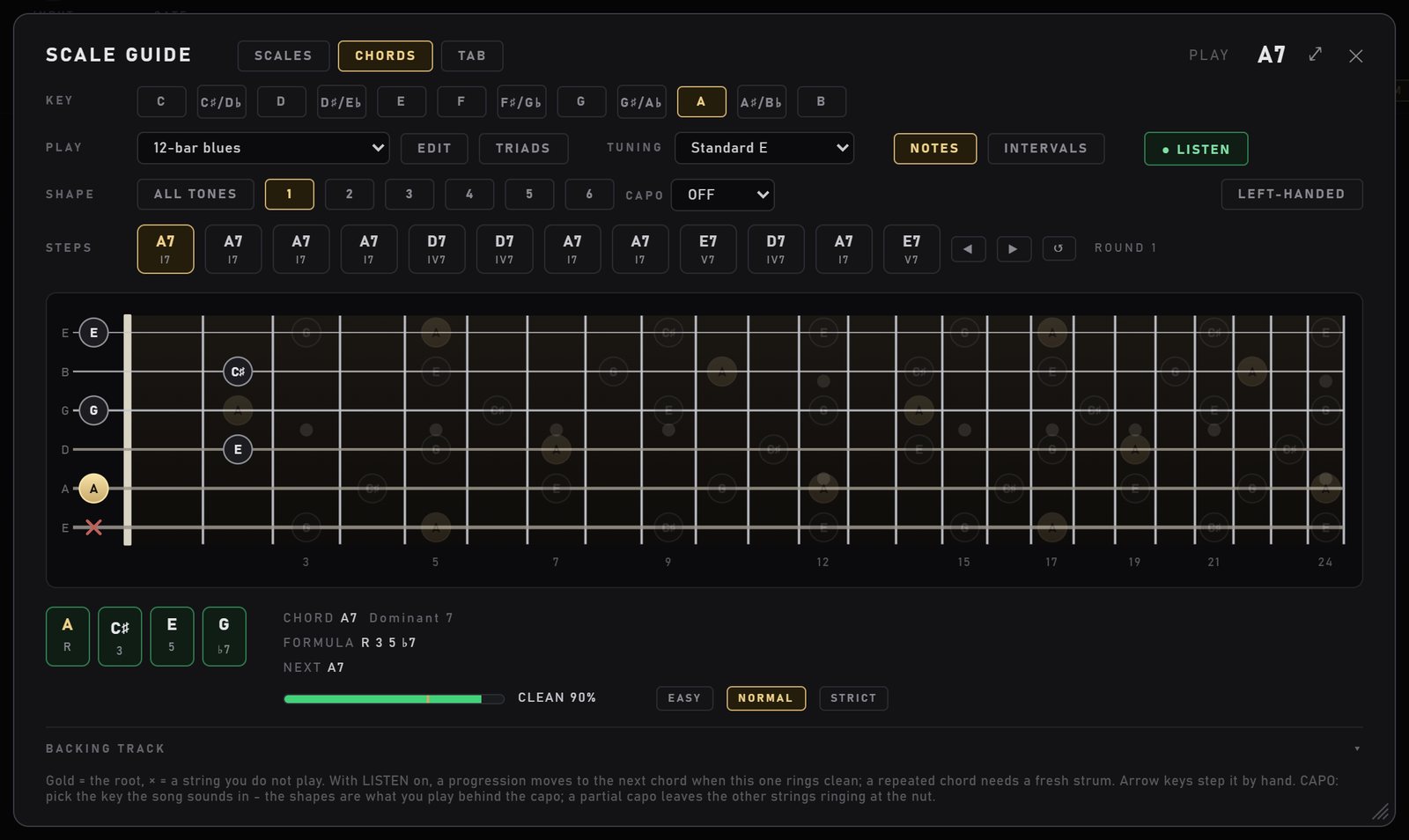
A 12-bar blues in A. The meter reads CLEAN 90%, and NEXT tells you what comes after this chord.
EASY, NORMAL or STRICT sets how clean the chord must be. Start on EASY, move up when it feels easy.
A repeated chord (A7 to A7) needs a fresh strum, so letting a chord ring does not count twice.
It listens to your guitar before the amp, so distortion on the rig does not matter.
The arrow keys step the progression by hand, and the loop counts your rounds.
If it never moves on: check that LISTEN is on (green), try EASY, and check your input level. Clean, evenly strummed chords work best. Mute the strings you do not play: the × strings ringing open count as extra notes. The trainer never changes your sound.
CAPO and partial capo
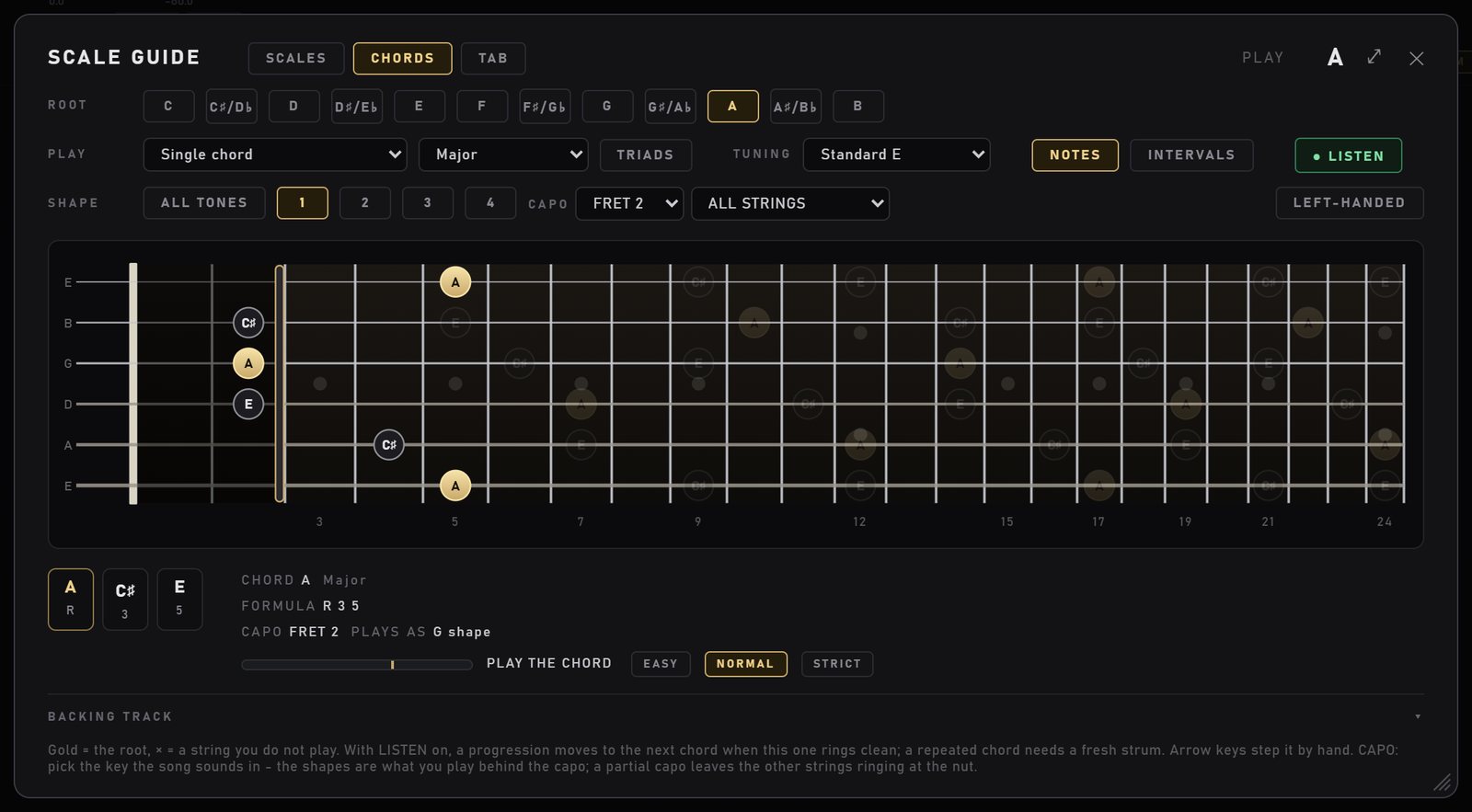
The CAPO menu (in CHORDS) puts a capo on fret 1 to 12. Pick the key the song sounds in, the same as without a capo. The shapes on the neck are what you play behind the capo, and the line under the neck tells you which shape that is.
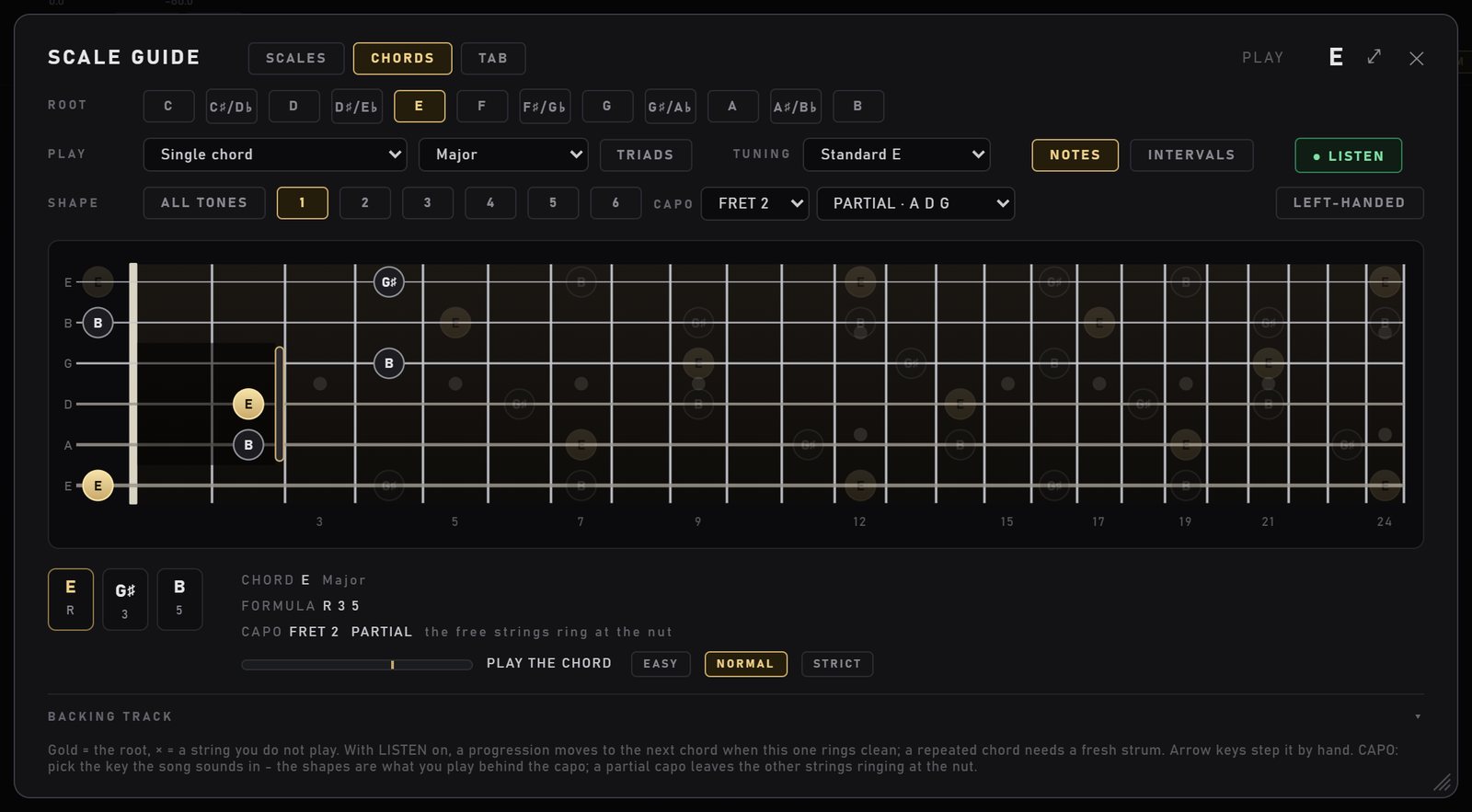
A capo does not have to cover every string. Choose ALL STRINGS, one of the common partial capos (A D G, A D G B E, D G B or E A D on six strings), or CUSTOM… to cover or free each string yourself, on any tuning including bass. The strings the capo leaves free ring open at the nut, and the guide works out new shapes for that setup. Progressions, the shape buttons and the chord trainer all follow the capo.
An A chord with the capo on fret 2 reads PLAYS AS G shape.A partial capo over A D G at fret 2: E major becomes 0 2 2 4 0 4.
TRIADS
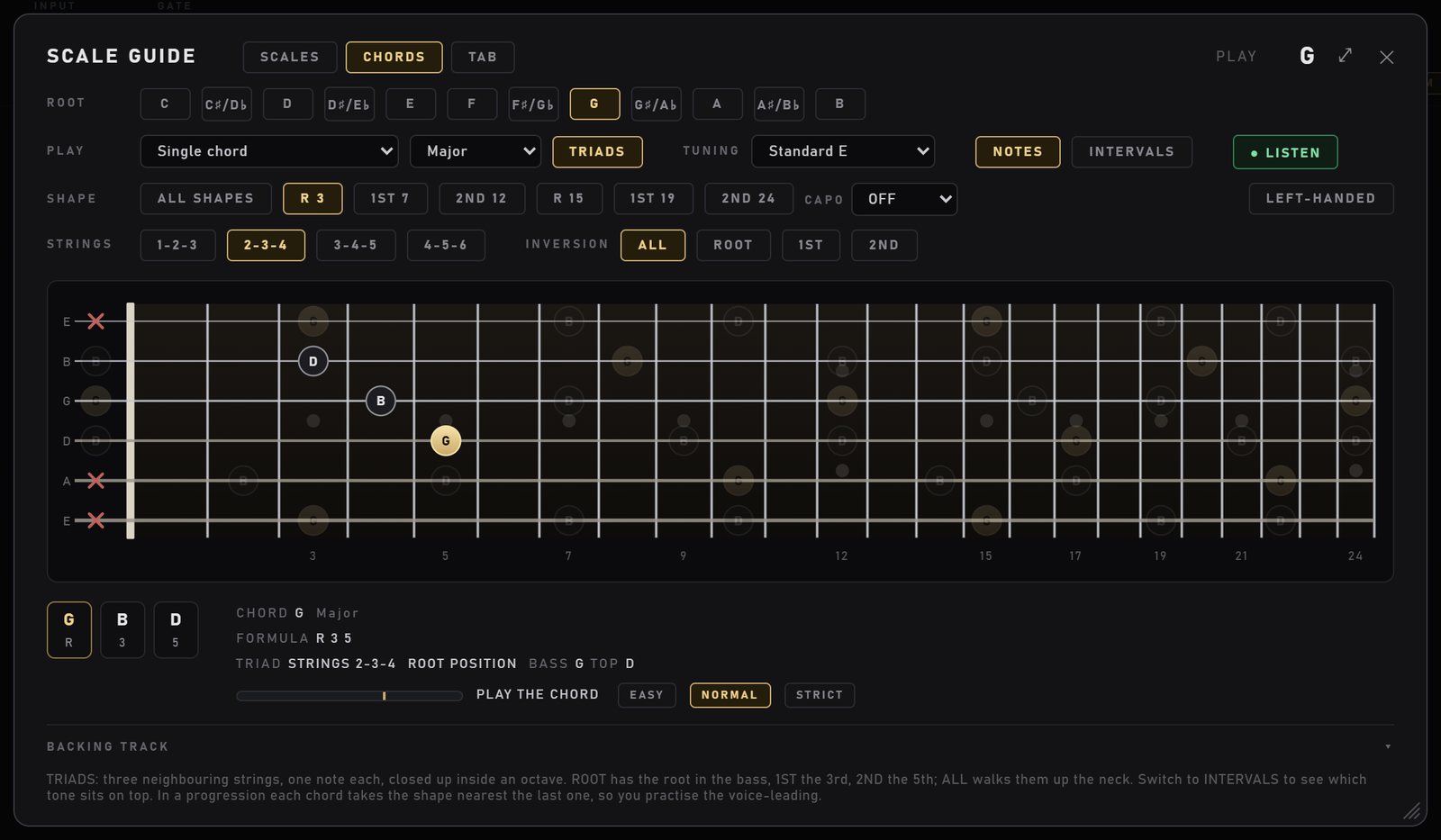
Press TRIADS for three-note shapes on three neighbouring strings: major, minor, diminished and augmented. Pick the STRINGS set (1-2-3, 2-3-4, 3-4-5, 4-5-6 on a six-string) and the INVERSION: ROOT (the root in the bass), 1ST (the 3rd in the bass), 2ND (the 5th in the bass), or ALL to walk them up the neck.
Triads work with progressions too. Bigger chords fold to their triad (A7 plays as A), and each chord takes the shape nearest the last one, so you practise voice-leading: small moves between chords instead of jumps.
G major on strings 2-3-4. The shape buttons list each inversion and its fret: R 3, 1ST 7, 2ND 12 and so on.
The TAB trainer PRO
Follow the tab and play the gold note. The tab moves on the moment that note rings from your guitar. Licks, scale patterns or your own tabs, with points and a progress page if you want them.
TAB is part of NAM 9000 Pro (€19 one-time). It is also in Pro Bass and Premium. Everything else on this page is free.
There is no free preview of TAB in the app: without Pro you see a PRO tag on the TAB button. Watch the video below to see exactly how it works before you decide.
The TAB trainer, 4:14. Plays from YouTube. Nothing loads from YouTube until you press play. Watch on YouTube
How the lane works
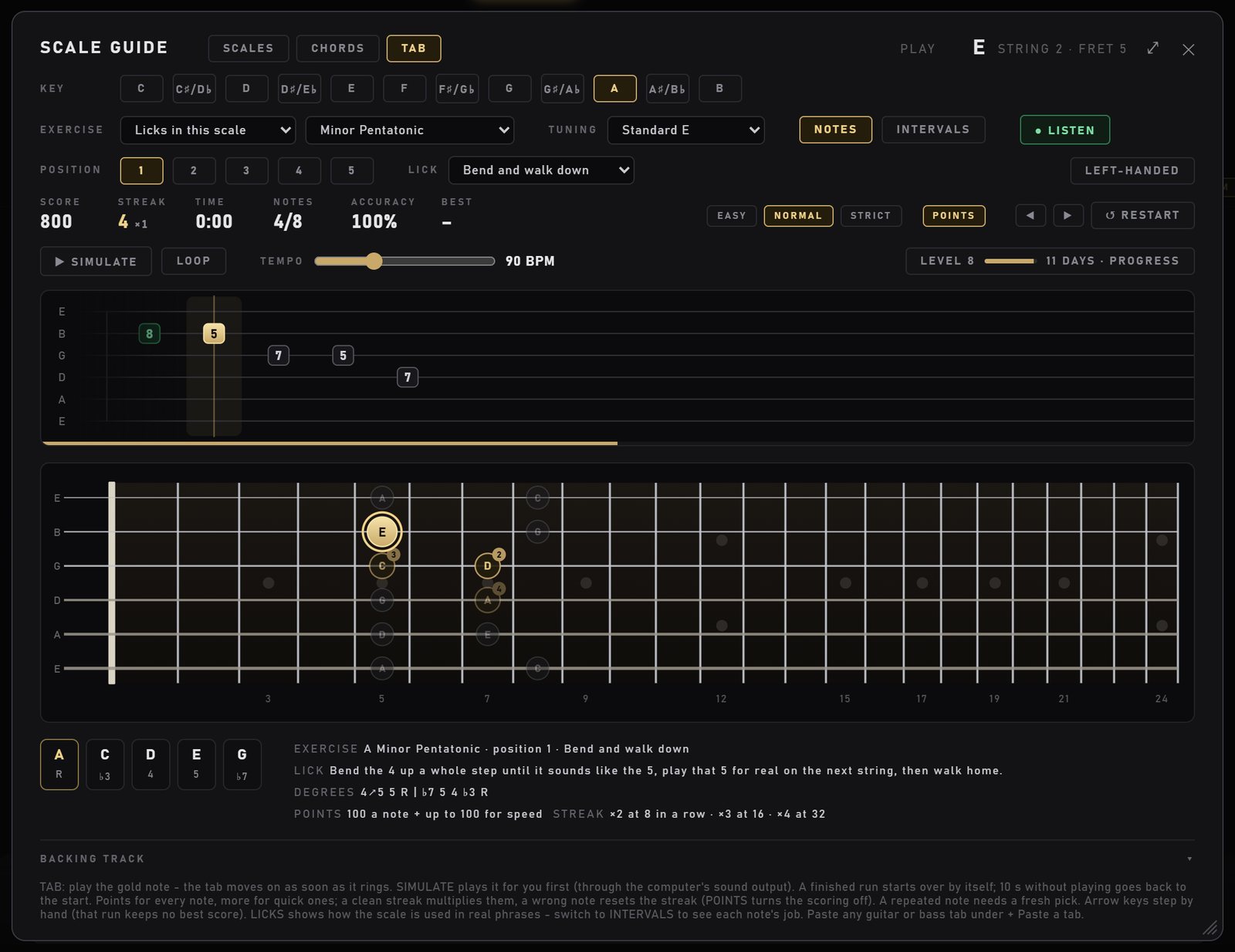
The tab slides past a gold playhead. On the neck below, the note to play is gold and the next three are numbered 2, 3, 4.
The top line names the note, the string and the fret, and the technique: bends, hammer-ons, pull-offs and slides are marked.
Play it right and it moves on. A repeated note needs a fresh pick.
It listens to your guitar before the amp, so high gain is fine.
A finished run starts over by itself after a few seconds. Stop playing for 10 seconds and it goes back to the start. The arrow keys step by hand (that run keeps no best score).
"Bend and walk down", a lick in A minor pentatonic, four notes in. Under the neck: what the lick teaches, its scale degrees and how points work.
What you can practise
Licks in this scale: 73 built-in licks, offered when they fit the scale you picked. Pentatonic and blues phrases, modes, metal and exotic scales. Each lick says what it teaches and lists its scale degrees. They are short phrases written for practice, not song riffs.
Scale patterns from the box you picked: up, down, up and down, groups of three, groups of four, and thirds, in every position.
Chromatic 1-2-3-4, a warm-up for the fretting hand.
MY TABS: paste any guitar or bass tab in plain text (ASCII) under + Paste a tab. It remembers the tuning you play it in, including your own tunings.
Move a lick around. Switch to INTERVALS to see every note's job in the lick, and change the POSITION to play the same lick in another box.
SIMULATE, LOOP and TEMPO
SIMULATE plays the exercise for you while the tab and the neck move along, so you hear how it should sound before you play it. LOOP repeats it, and TEMPO sets the speed from 40 to 200 BPM. SIMULATE plays through your computer's sound output, not through the rig or your DAW.
Difficulty, points and grades
EASY, NORMAL or STRICT sets how exact the note must be. EASY forgives the octave. STRICT wants the exact note.
Every right note gives 100 points plus up to 100 for speed. A clean streak multiplies them: ×2 at 8 notes in a row, ×3 at 16, ×4 at 32. A wrong note resets the streak.
At the end of a run you get a grade from S to D, your speed and accuracy, and a best score per exercise and difficulty.
Rather just read the tab? Turn POINTS off. The score row, pop-ups and levels go away. At the end of a run you see ✓ CLEAN (no wrong note) or ✓ DONE, plus ↑ IMPROVING when you beat your last run of that exercise. Runs are still recorded, so turning POINTS back on shows your real history.
PROGRESS
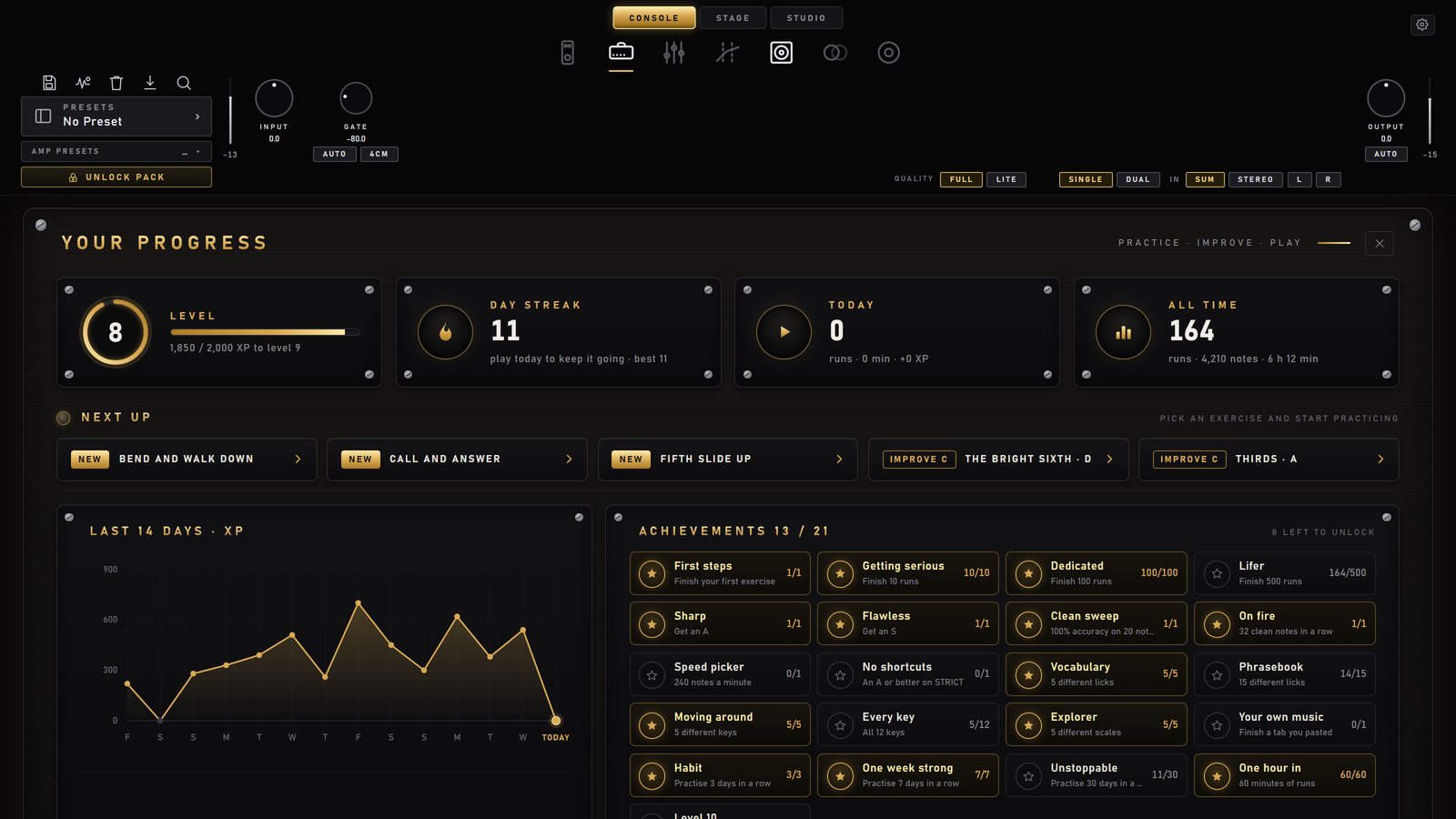
The level chip opens YOUR PROGRESS: XP and levels, a day streak, today and all time, NEXT UP suggestions (new licks to try, exercises to improve), the last 14 days, 21 achievements, and every exercise with its best grade and your last runs. One click plays any of them again. Progress is stored on that computer only.
The PROGRESS page, shown with an example practice history.
Backing tracks FREE
Jam over any YouTube backing track without leaving the app.
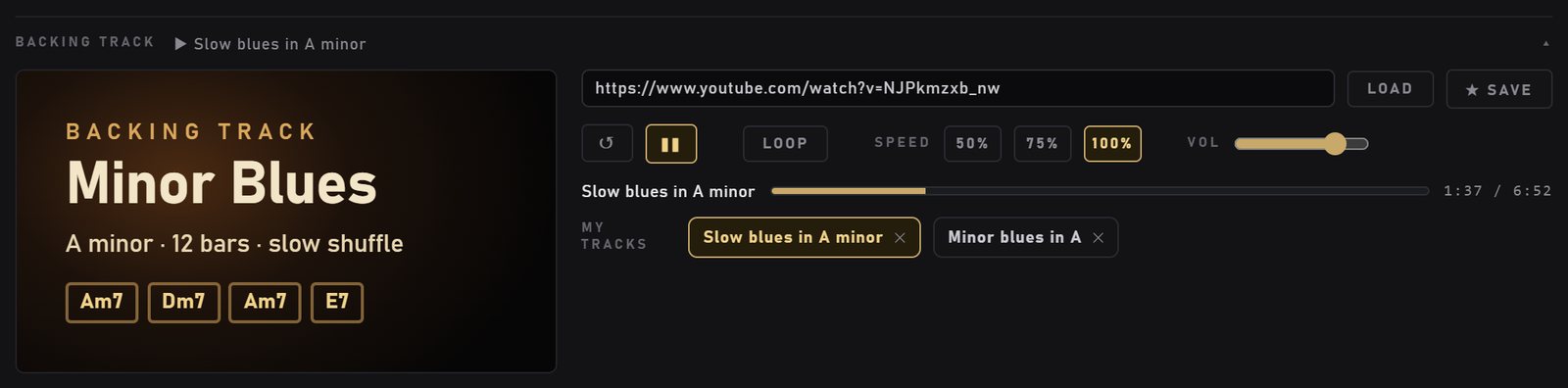
Open BACKING TRACK at the bottom of the guide, paste a YouTube link (a video or a playlist) and press LOAD.
Play and pause, start over, seek, set the volume, and for a playlist go to the next or previous track.
LOOP plays it again and again. SPEED 50, 75 or 100 % slows it down to learn at your own pace.
★ SAVE keeps the link under MY TRACKS. Two blues tracks in A minor are there to start with.
The backing track panel. (The video picture is a stand-in for the screenshot; your track shows its own video.)
It keeps playing when you close the guide
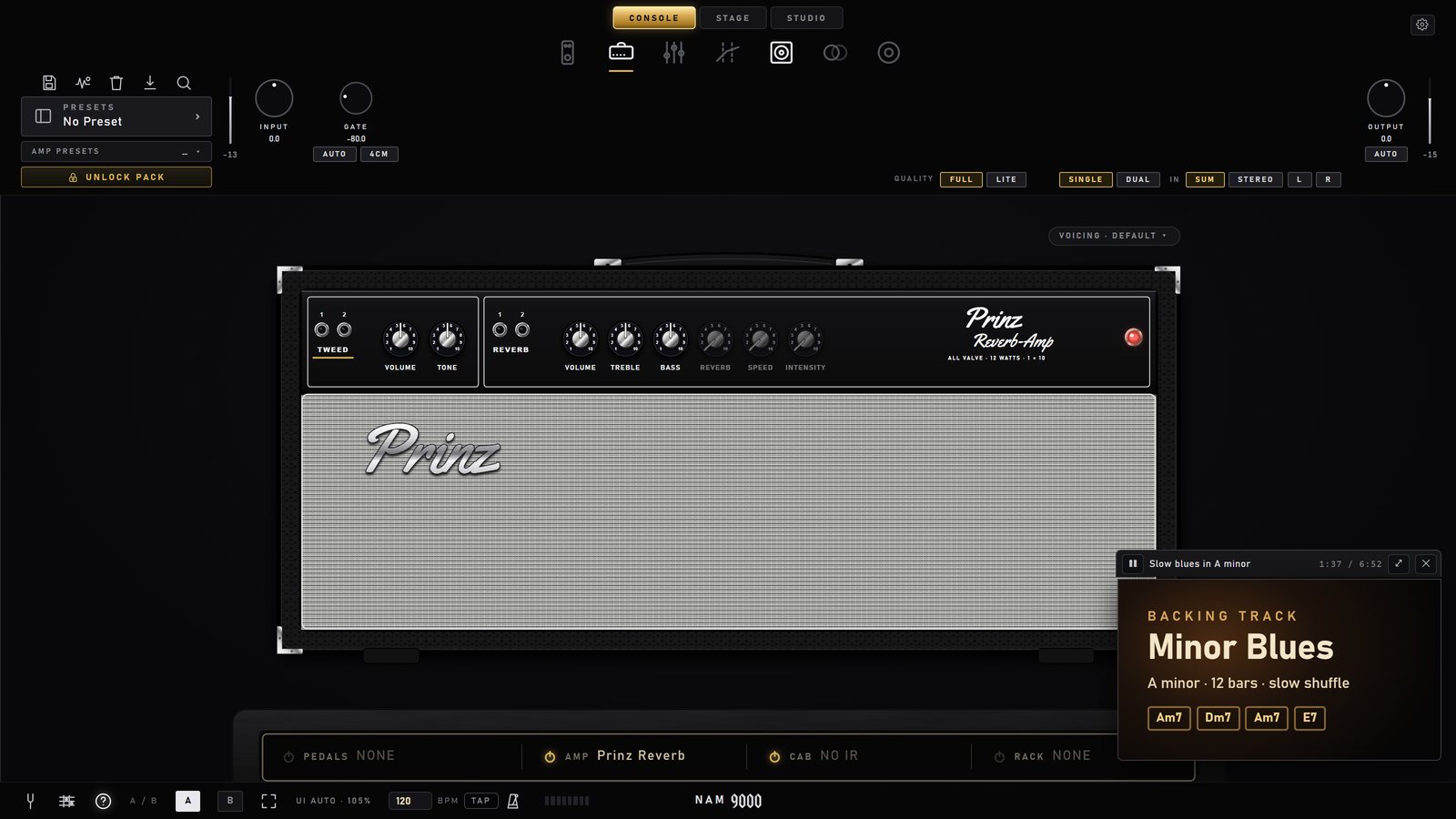
Close the guide while a track plays and it moves to a small corner player, so you can tweak your amp and pedals and keep jamming. The corner player has play and pause, the time, a button back to the guide, and a close button that pauses and hides it. Drag it wherever you want it. (Since 1.23.)
The corner player over the amp page.
Good to know: the backing track plays through your computer's default sound output, not through NAM 9000 or your DAW. It does not go through the rig and it is not recorded with your guitar. It needs an internet connection, and nothing loads from YouTube until you load a link. A video whose owner turned off embedding cannot play here; the guide says so, so pick another upload.
How to practise with it
A few simple routines, built only from what is in the guide. Stay in one key for a whole session: the scale, the licks, the chords and the backing track then all fit together.
10 minutes a day
The daily ten
2 min, SCALES. A minor pentatonic, position 1, LISTEN on. Play the box up and down slowly. Every note should light green.
3 min, TAB (Pro). Pick a lick in the same scale. Press SIMULATE at a slow TEMPO to hear it, then play it until you get a clean run.
3 min, CHORDS. The minor blues in A with LISTEN on, on EASY or NORMAL. Let the trainer pull you through the changes.
2 min, BACKING TRACK. Load an A minor track and improvise in the box you just played. Use the lick.
No Pro? Swap step 2 for the box in INTERVALS view: say the interval of each note as you play it.
One scale, the whole neck
Connect the boxes
Play position 1, then position 2. Find the notes they share: that is where you slide from one to the next.
Repeat for 3, 4 and 5, then look at WHOLE NECK: it is the five boxes joined.
Switch to INTERVALS and find every root (R) in each box.
With Pro: run "Up and down" or "Groups of three" in each position.
Rhythm and chords
Chord changes that stick
Pick a progression, start on EASY and go round until the trainer never waits for you.
Move to NORMAL, then STRICT. Mute the strings marked ×.
Turn on TRIADS on strings 2-3-4 and play the same progression with small moves between shapes.
Try the same progression with the capo or in another key. The trainer follows.
Pro: build speed
Clean first, then fast
Pick one pattern or lick and play it on NORMAL until the grade comes up A or S.
Then aim for speed: points include a speed bonus, so a faster clean run scores higher.
Keep the streak: ×2 at 8 clean notes, ×4 at 32.
Check PROGRESS for NEXT UP and keep the day streak going.
Want a click? The bottom bar of NAM 9000 has a metronome with BPM and TAP.
Yes. SCALES, CHORDS, the chord trainer, CAPO, TRIADS, MY TUNINGS, the left-handed neck and the BACKING TRACK player are free in every edition, on Windows and Mac. Only the TAB trainer is part of NAM 9000 Pro (€19 one-time, also in Pro Bass and Premium).
Can I try the TAB trainer before I buy Pro?
No. There is no free preview of TAB in the app. The TAB trainer video above shows exactly how it works.
Will the backing track be recorded with my guitar?
No. It plays through your computer's default sound output, not through NAM 9000 or your DAW, so it is not recorded and does not go through the rig. It needs an internet connection.
Does the chord trainer work with a distorted sound?
Yes. The chord trainer and the TAB trainer listen to your guitar before the amp, so high gain does not matter. Clean, evenly strummed chords work best. If it never moves on, check that LISTEN is on, try EASY, and check your input level.
Does it work for bass and 7- or 8-string guitar?
Yes. The tuning list has 4- and 5-string bass, 7-string and 8-string guitar, drop and open tunings, and MY TUNINGS lets you make your own with 4 to 8 strings. The TAB trainer also takes pasted bass tabs.
Is my progress saved?
Yes, on that computer. Your guide settings, progressions, tunings, tracks, tabs and TAB progress are stored on the computer you practise on. They are not saved in presets and are not synced between machines.
Start practising
The Scale Guide comes with NAM 9000, free for Windows and Mac. Add Pro for the TAB trainer, dual amps, Render Rig and more.